> ## Documentation Index
> Fetch the complete documentation index at: https://docs.textmine.com/llms.txt
> Use this file to discover all available pages before exploring further.

# 19 January 2026

> Image types, table extraction, and more

<Note>
  This page was imported from Intercom and may describe older navigation or terminology. Source: [https://help.textmine.com/en/articles/13431363-19-january-2026](https://help.textmine.com/en/articles/13431363-19-january-2026)
</Note>

## Image Types

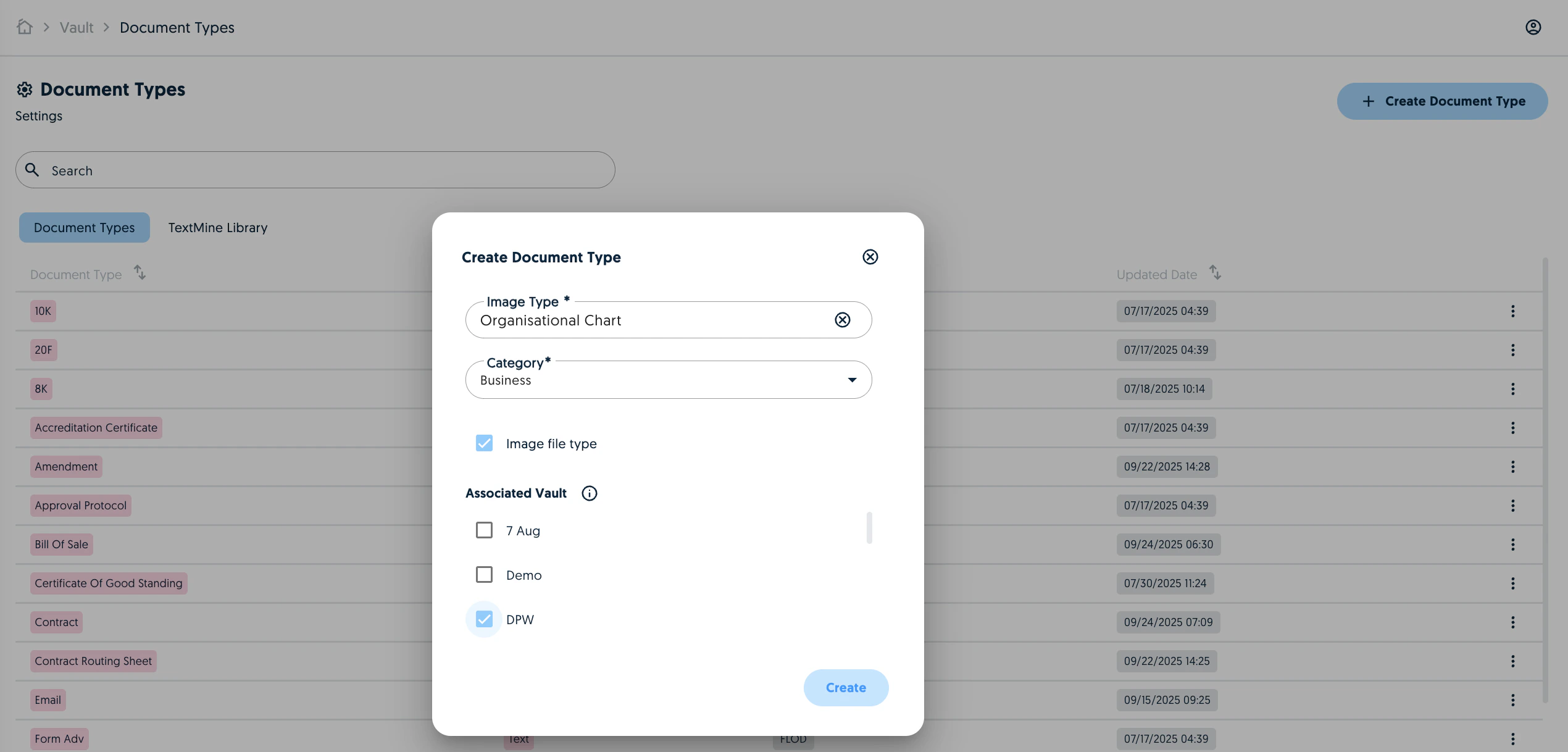
You can now have document types for images and Vault now supports image uploads (jpeg, png). To do this, create a document type and select image file type. You can associate the image type to the relevant Vaults.
<img src="https://mintcdn.com/textmine/7TMdi9xcGt0Zk4KH/images/intercom/product-updates/19-january-2026/01-screenshot-2026-01-19-at-12-43-17.png?fit=max&auto=format&n=7TMdi9xcGt0Zk4KH&q=85&s=1d1db32fdc5ca01088ed44ac52a13701" alt="Screenshot" width="2540" height="1218" data-path="images/intercom/product-updates/19-january-2026/01-screenshot-2026-01-19-at-12-43-17.png" />

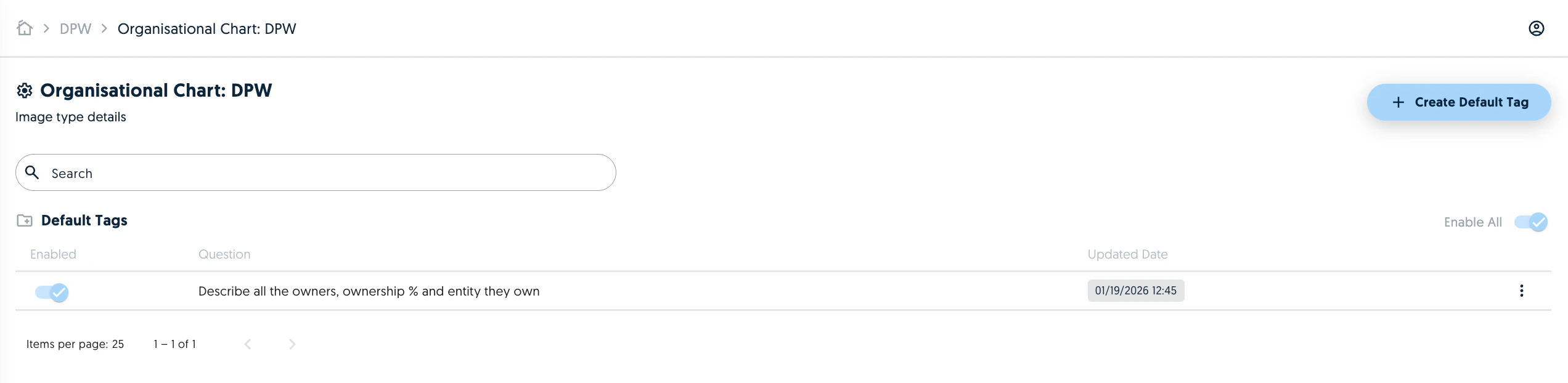
You can then create default tags for the image.
<img src="https://mintcdn.com/textmine/7TMdi9xcGt0Zk4KH/images/intercom/product-updates/19-january-2026/02-screenshot-2026-01-19-at-12-45-46.png?fit=max&auto=format&n=7TMdi9xcGt0Zk4KH&q=85&s=4e126bd5cc08ead5ae1fb9b7093e4880" alt="Screenshot" width="2544" height="622" data-path="images/intercom/product-updates/19-january-2026/02-screenshot-2026-01-19-at-12-45-46.png" />

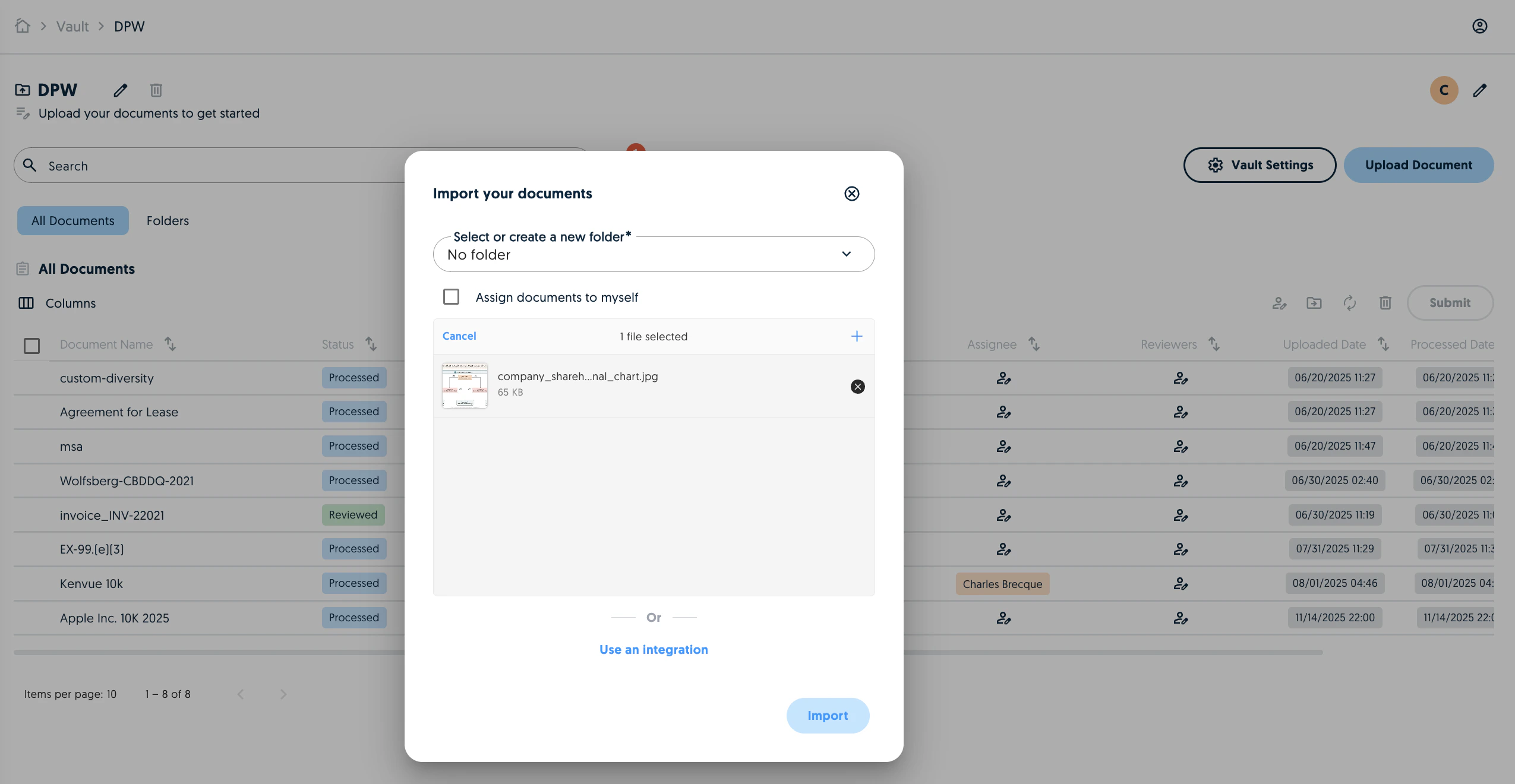
Once the image tags are created, you can upload the image to the corresponding Vault.
<img src="https://mintcdn.com/textmine/7TMdi9xcGt0Zk4KH/images/intercom/product-updates/19-january-2026/03-screenshot-2026-01-19-at-12-47-03.png?fit=max&auto=format&n=7TMdi9xcGt0Zk4KH&q=85&s=2c54f15f4f98c09b0daca22a8594cd40" alt="Screenshot" width="2550" height="1320" data-path="images/intercom/product-updates/19-january-2026/03-screenshot-2026-01-19-at-12-47-03.png" />

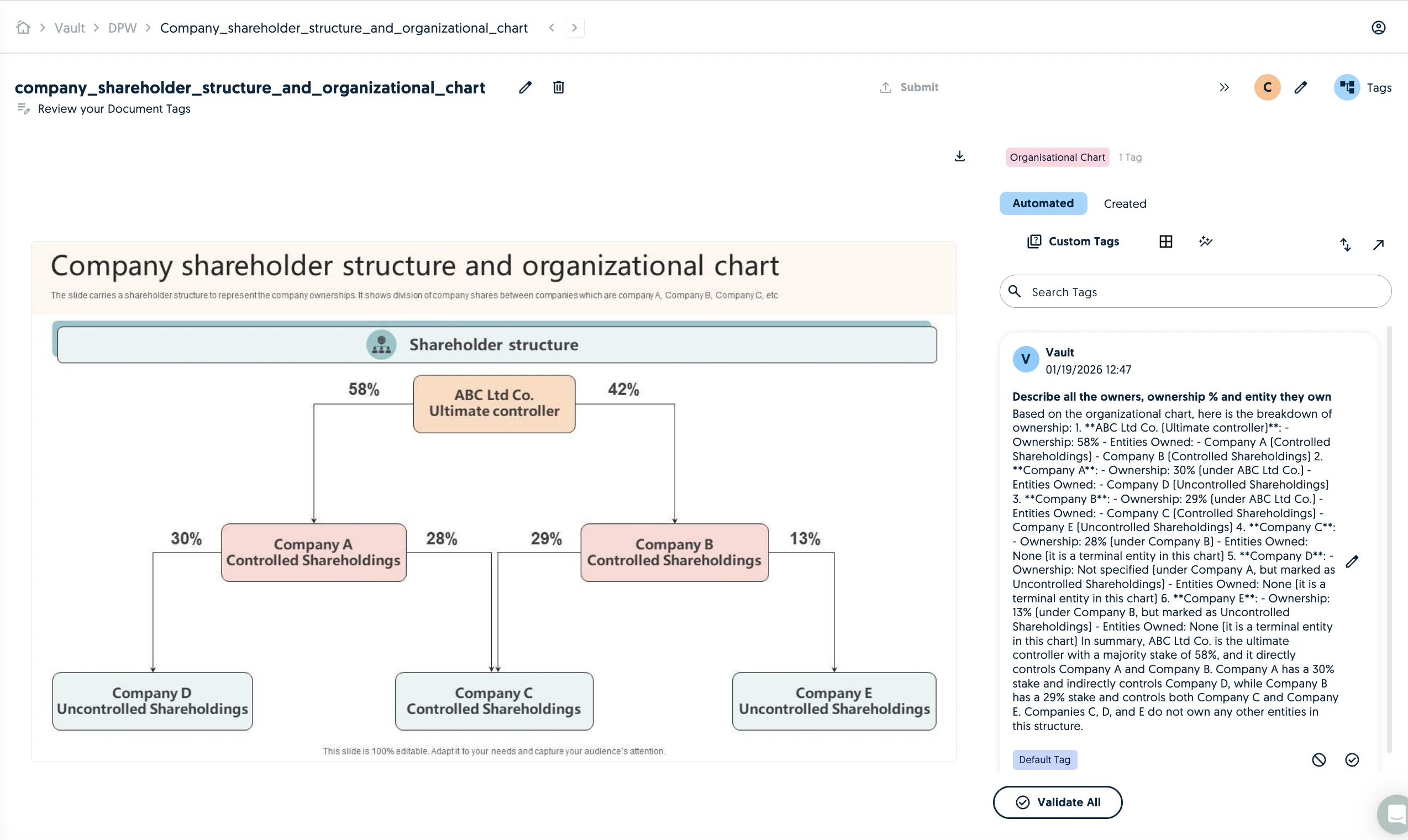
You can then review the image and associated tags.
<img src="https://mintcdn.com/textmine/7TMdi9xcGt0Zk4KH/images/intercom/product-updates/19-january-2026/04-screenshot-2026-01-19-at-12-48-03.png?fit=max&auto=format&n=7TMdi9xcGt0Zk4KH&q=85&s=3182bca619dde70e241b7eec4565953f" alt="Screenshot" width="2548" height="1520" data-path="images/intercom/product-updates/19-january-2026/04-screenshot-2026-01-19-at-12-48-03.png" />

## Table extraction

TextMine now offers table extraction from documents. You can either extract tables via a manual selection or enable it automatically for the Vault.

### Manual selection

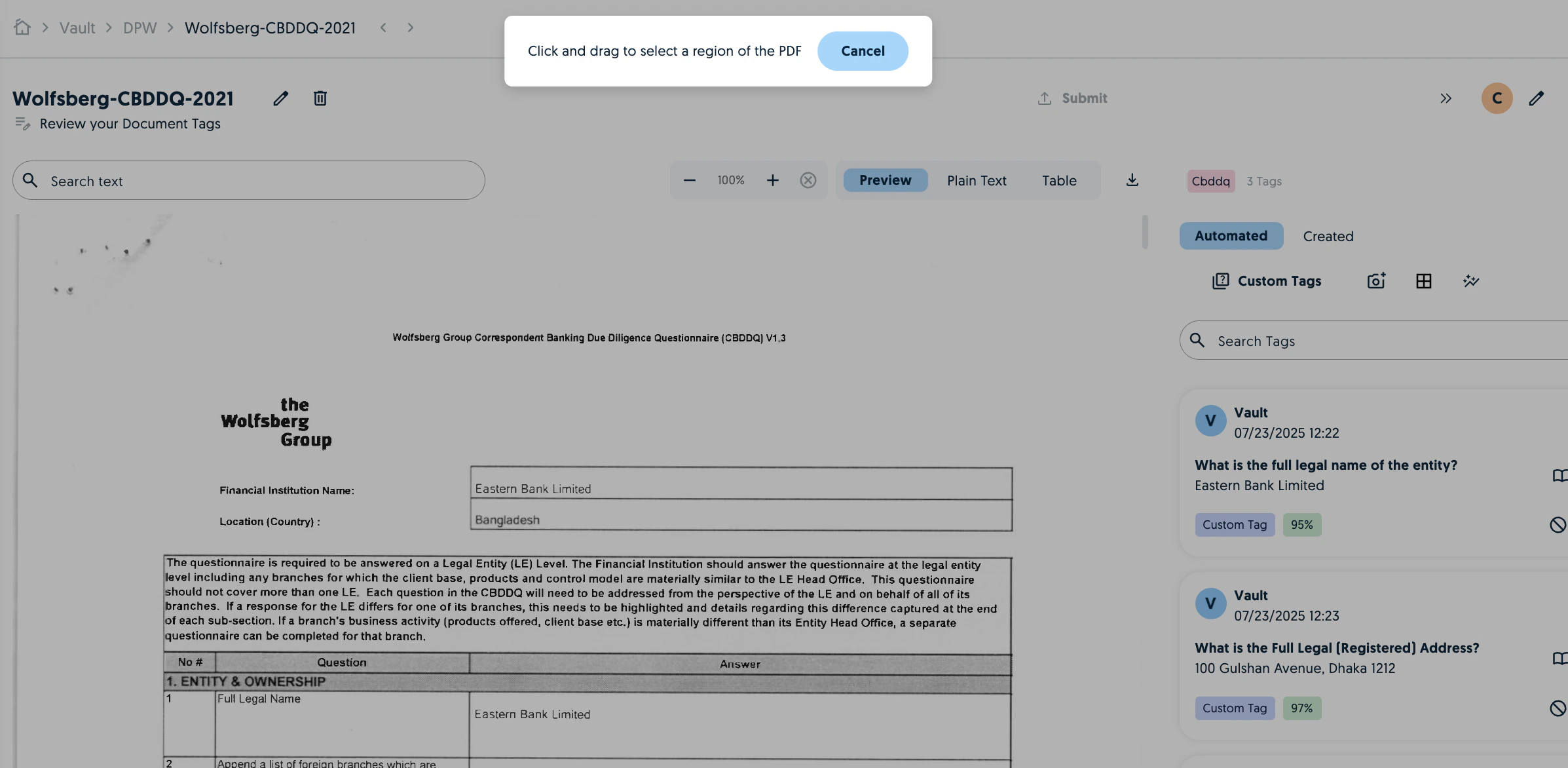
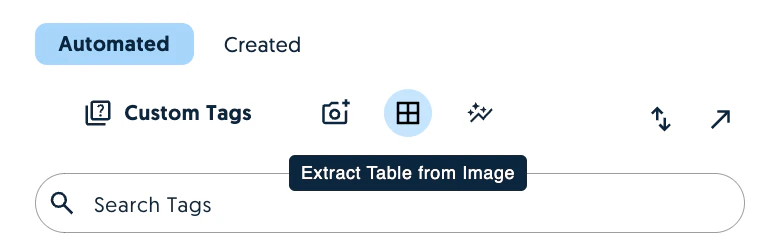
Click on extract table from Image and use the cursor to select the table in the preview.
<img src="https://mintcdn.com/textmine/7TMdi9xcGt0Zk4KH/images/intercom/product-updates/19-january-2026/05-screenshot-2026-01-19-at-12-41-41.png?fit=max&auto=format&n=7TMdi9xcGt0Zk4KH&q=85&s=f1c40cd59f80df1c2e6bdb7a917ab010" alt="Screenshot" width="770" height="252" data-path="images/intercom/product-updates/19-january-2026/05-screenshot-2026-01-19-at-12-41-41.png" />

<img src="https://mintcdn.com/textmine/7TMdi9xcGt0Zk4KH/images/intercom/product-updates/19-january-2026/06-screenshot-2026-01-19-at-12-41-32.png?fit=max&auto=format&n=7TMdi9xcGt0Zk4KH&q=85&s=cd76fe32b955e75ed7a135781855a217" alt="Screenshot" width="2394" height="1172" data-path="images/intercom/product-updates/19-january-2026/06-screenshot-2026-01-19-at-12-41-32.png" />

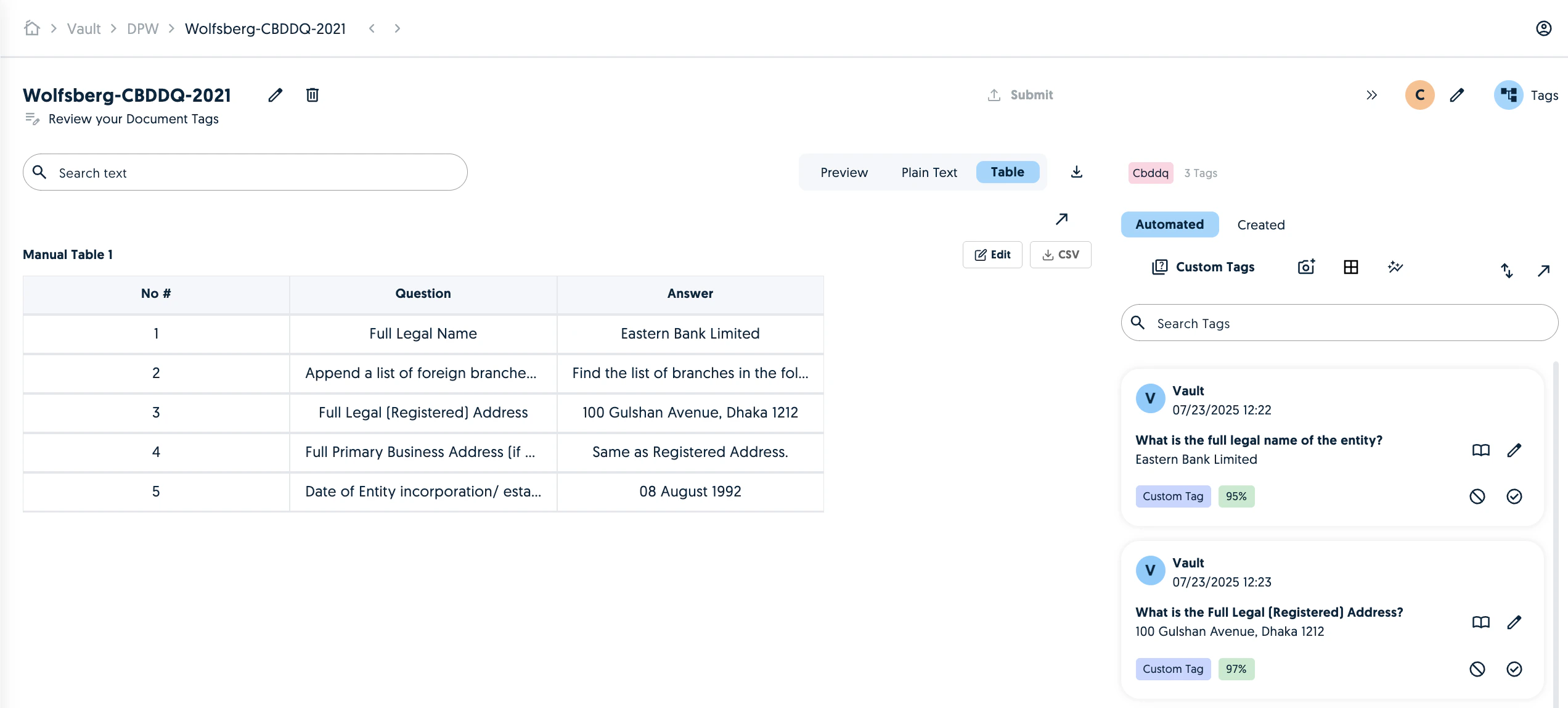
Once the extraction is complete, you'll see the table in the Table tab. You can edit the values or download the extracted table to CSV.
<img src="https://mintcdn.com/textmine/7TMdi9xcGt0Zk4KH/images/intercom/product-updates/19-january-2026/07-screenshot-2026-01-19-at-12-32-33.png?fit=max&auto=format&n=7TMdi9xcGt0Zk4KH&q=85&s=4f484768ee6a6ed642dba5d99549dea8" alt="Screenshot" width="2544" height="1148" data-path="images/intercom/product-updates/19-january-2026/07-screenshot-2026-01-19-at-12-32-33.png" />

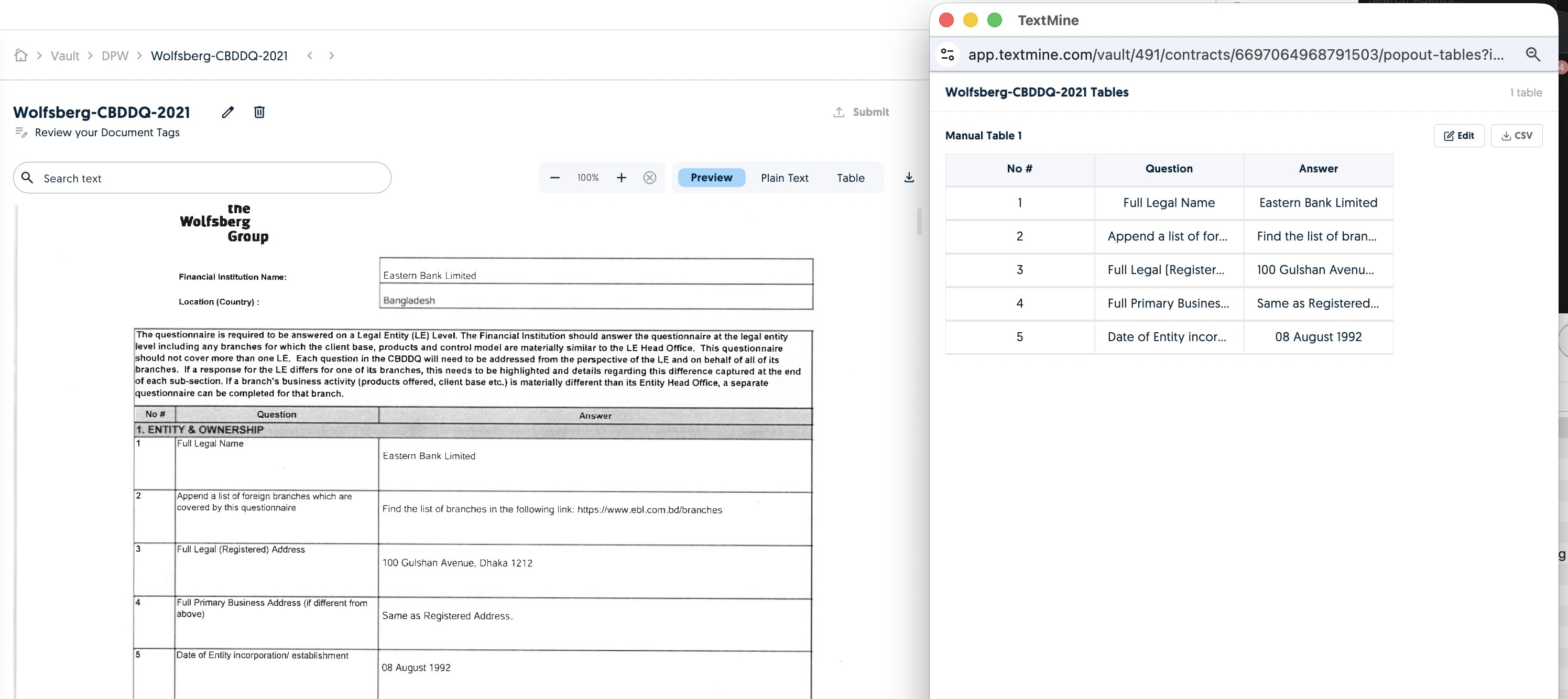
To cross-reference the results more easily, click on the pop up arrow above CSV to pop out the table in new window.
<img src="https://mintcdn.com/textmine/7TMdi9xcGt0Zk4KH/images/intercom/product-updates/19-january-2026/08-screenshot-2026-01-19-at-12-33-02.png?fit=max&auto=format&n=7TMdi9xcGt0Zk4KH&q=85&s=de70b56fc3858ff9f8c028dca483a946" alt="Screenshot" width="2992" height="1334" data-path="images/intercom/product-updates/19-january-2026/08-screenshot-2026-01-19-at-12-33-02.png" />

To enable automated table extraction for the Vault, go to the Vault settings and enable it in the Default settings. This will apply to all documents uploaded to the Vault.

<img src="https://mintcdn.com/textmine/7TMdi9xcGt0Zk4KH/images/intercom/product-updates/19-january-2026/09-screenshot-2026-01-19-at-12-42-28.png?fit=max&auto=format&n=7TMdi9xcGt0Zk4KH&q=85&s=ec6d607fd6291f42ba8aeaf9ca0411b9" alt="Screenshot" width="2544" height="456" data-path="images/intercom/product-updates/19-january-2026/09-screenshot-2026-01-19-at-12-42-28.png" />

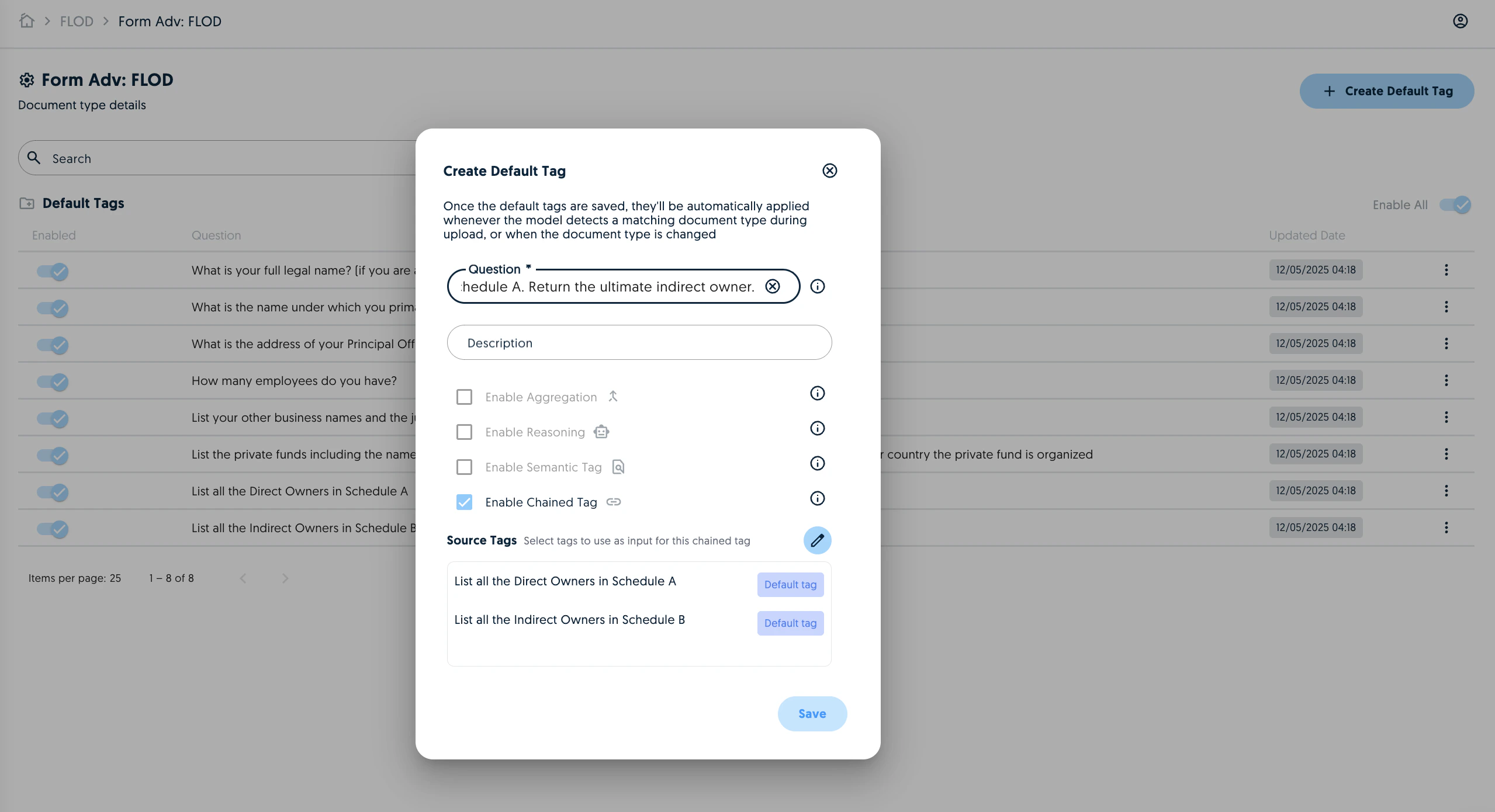
## Chained tags in Document Types

It is now possible to create default chained tags.
<img src="https://mintcdn.com/textmine/7TMdi9xcGt0Zk4KH/images/intercom/product-updates/19-january-2026/10-screenshot-2026-01-19-at-12-53-31.png?fit=max&auto=format&n=7TMdi9xcGt0Zk4KH&q=85&s=1f29a2c07402dc467bec3e1ed15f29f8" alt="Screenshot" width="2558" height="1390" data-path="images/intercom/product-updates/19-january-2026/10-screenshot-2026-01-19-at-12-53-31.png" />

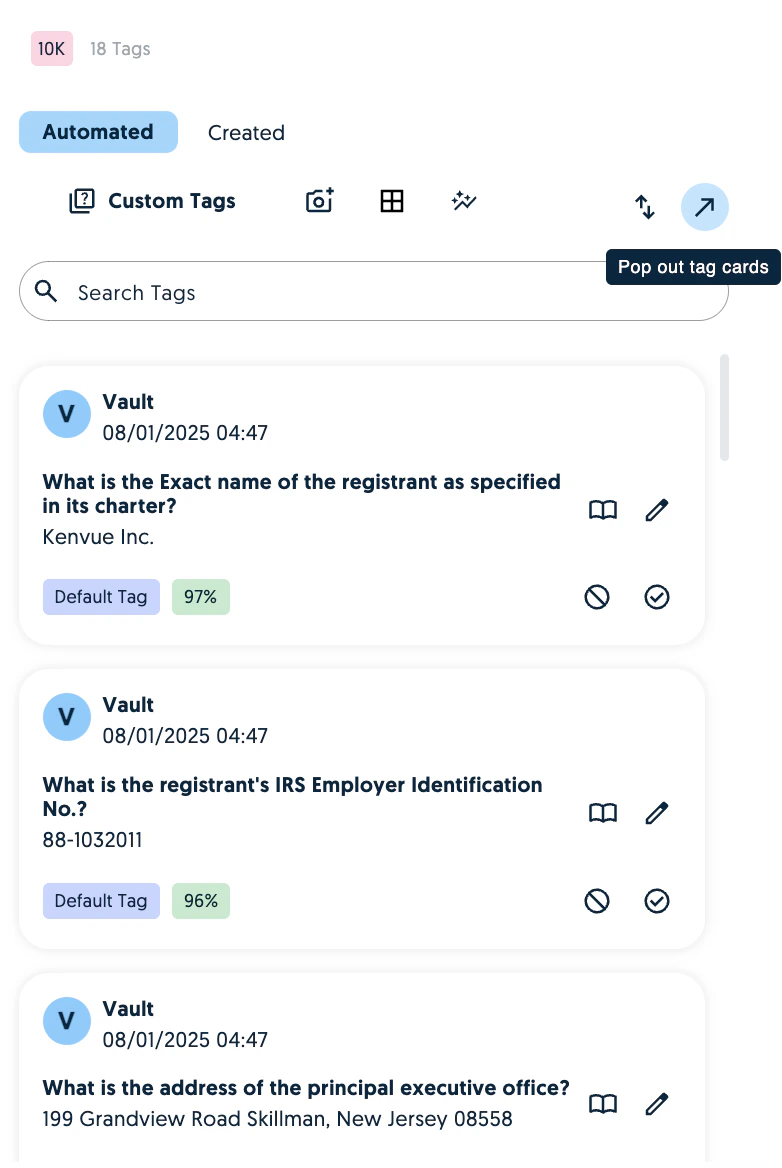
## Pop out tags

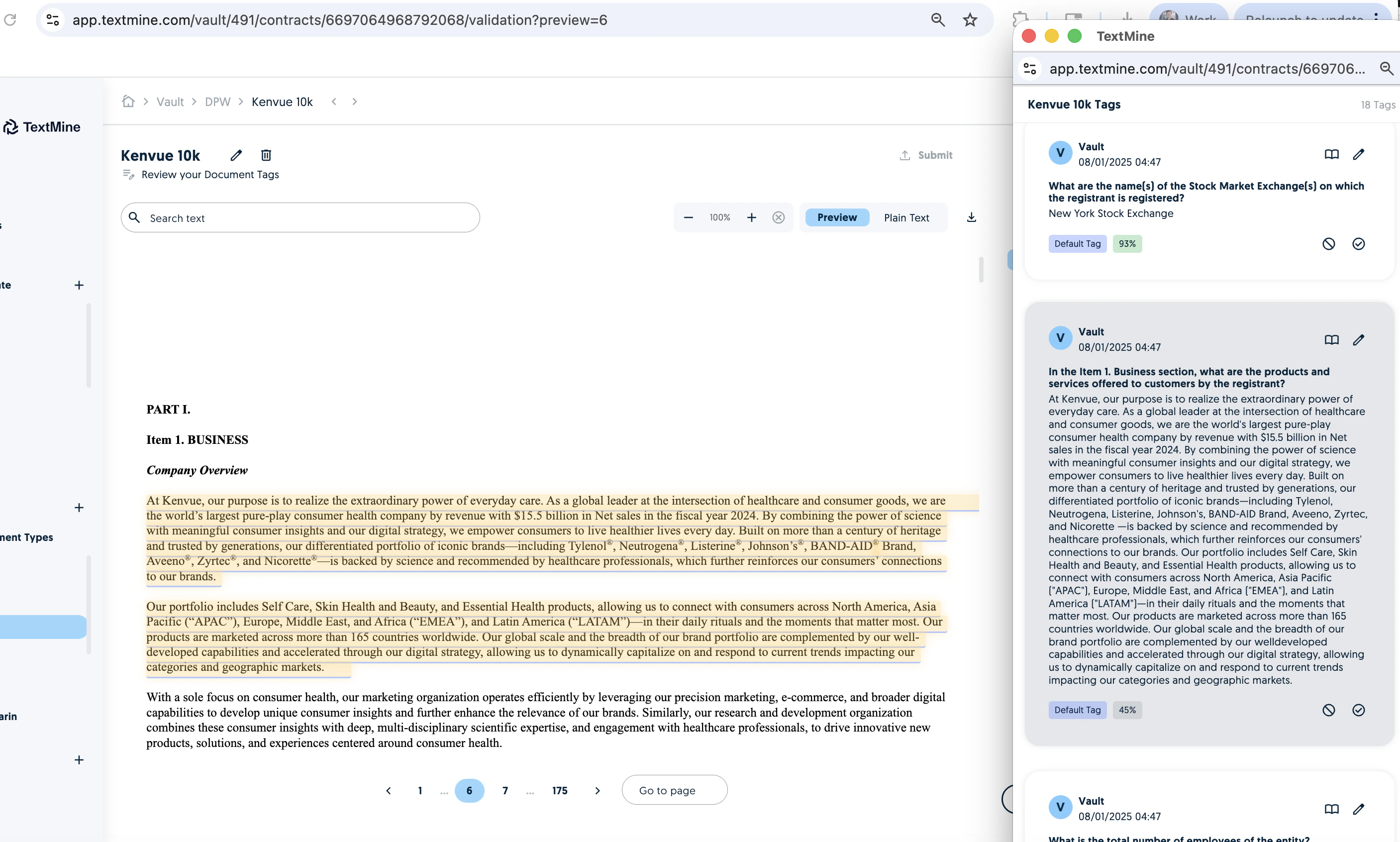
You can now pop out the tags cards to a new window in order to simplify the document/tag cross-referencing.
<img src="https://mintcdn.com/textmine/7TMdi9xcGt0Zk4KH/images/intercom/product-updates/19-january-2026/11-screenshot-2026-01-19-at-12-55-53.png?fit=max&auto=format&n=7TMdi9xcGt0Zk4KH&q=85&s=def73083d6d5968507bd844f38e39a69" alt="Screenshot" width="782" height="1168" data-path="images/intercom/product-updates/19-january-2026/11-screenshot-2026-01-19-at-12-55-53.png" />

The same functionality as in the editor is mirrored in the pop out.
<img src="https://mintcdn.com/textmine/7TMdi9xcGt0Zk4KH/images/intercom/product-updates/19-january-2026/12-screenshot-2026-01-19-at-12-56-16.png?fit=max&auto=format&n=7TMdi9xcGt0Zk4KH&q=85&s=5aa4f9fa2b32cce54fa8bdb29ad463e2" alt="Screenshot" width="2814" height="1692" data-path="images/intercom/product-updates/19-january-2026/12-screenshot-2026-01-19-at-12-56-16.png" />

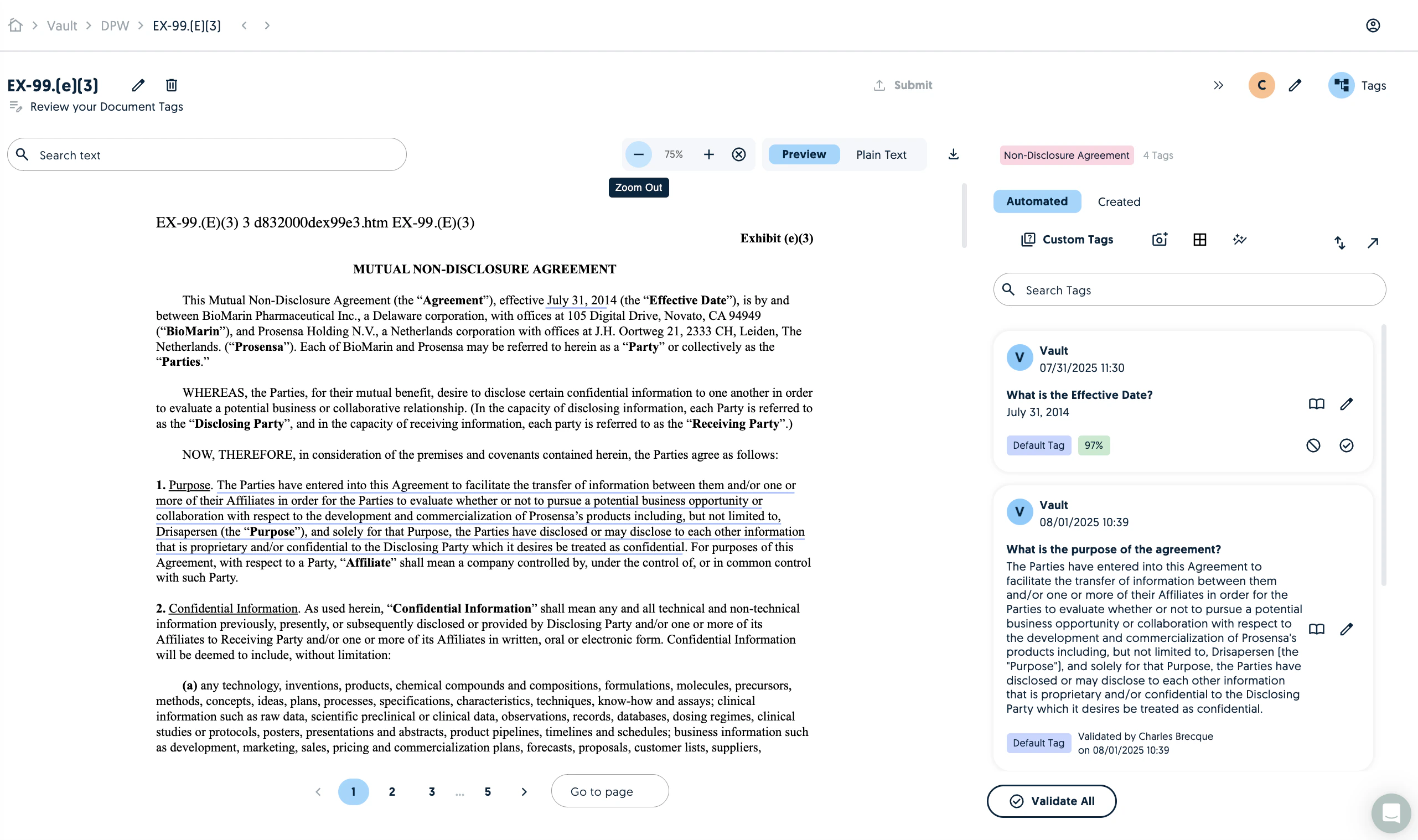
## Zoom in and out

You can now change the zoom resolution of the document upload.
<img src="https://mintcdn.com/textmine/7TMdi9xcGt0Zk4KH/images/intercom/product-updates/19-january-2026/13-screenshot-2026-01-19-at-13-00-58.png?fit=max&auto=format&n=7TMdi9xcGt0Zk4KH&q=85&s=a1e423b32fc639c5430b5f5050dac261" alt="Screenshot" width="2562" height="1518" data-path="images/intercom/product-updates/19-january-2026/13-screenshot-2026-01-19-at-13-00-58.png" />

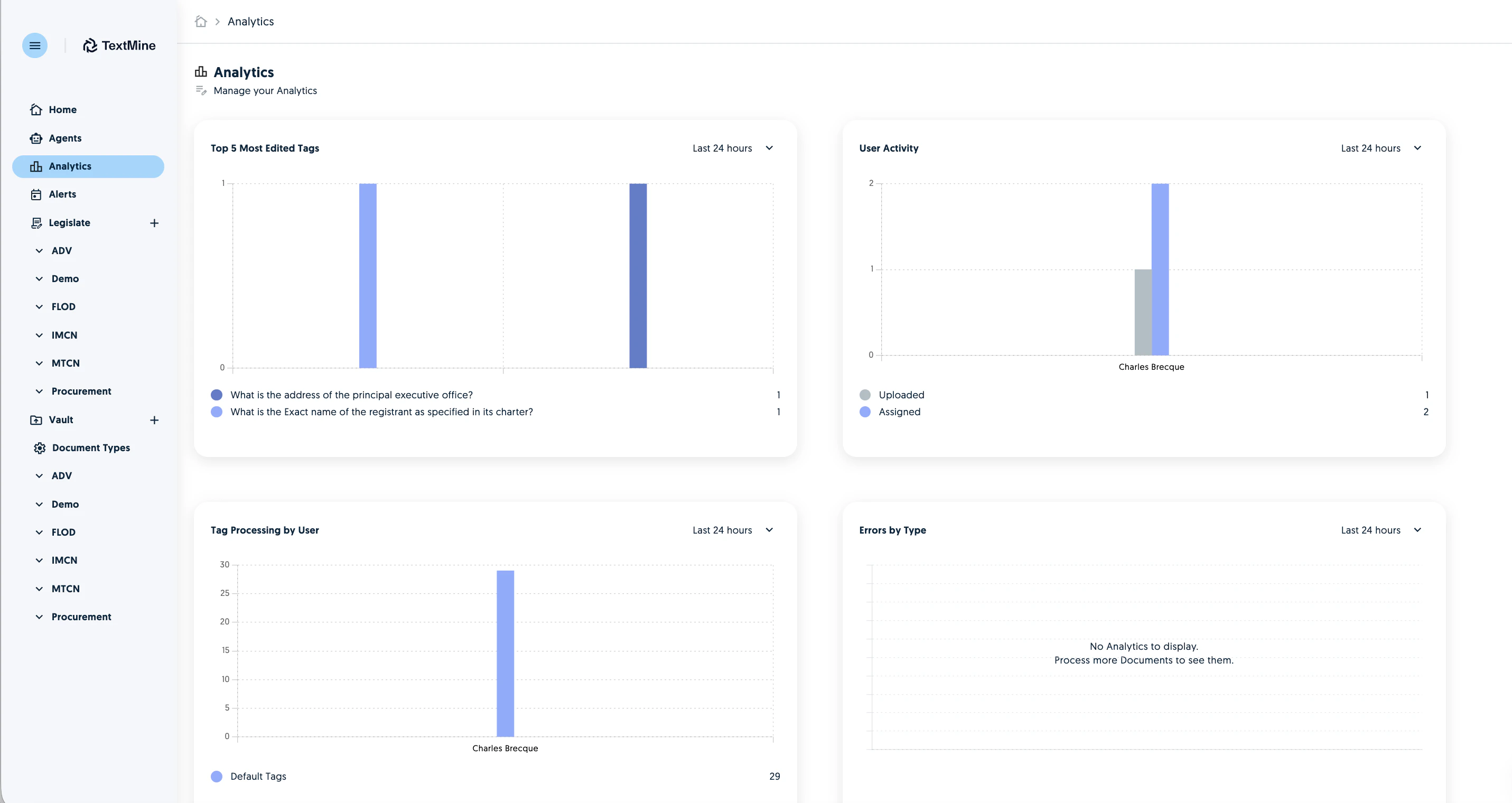
## Analytics improvements

The Analytics are now tracking additional metrics such as the most edited tags, errors, time spent reviewing and general user activity.
<img src="https://mintcdn.com/textmine/7TMdi9xcGt0Zk4KH/images/intercom/product-updates/19-january-2026/14-screenshot-2026-01-19-at-20-44-18.png?fit=max&auto=format&n=7TMdi9xcGt0Zk4KH&q=85&s=771b7a549aff4a079ff71208a10df655" alt="Screenshot" width="2862" height="1520" data-path="images/intercom/product-updates/19-january-2026/14-screenshot-2026-01-19-at-20-44-18.png" />

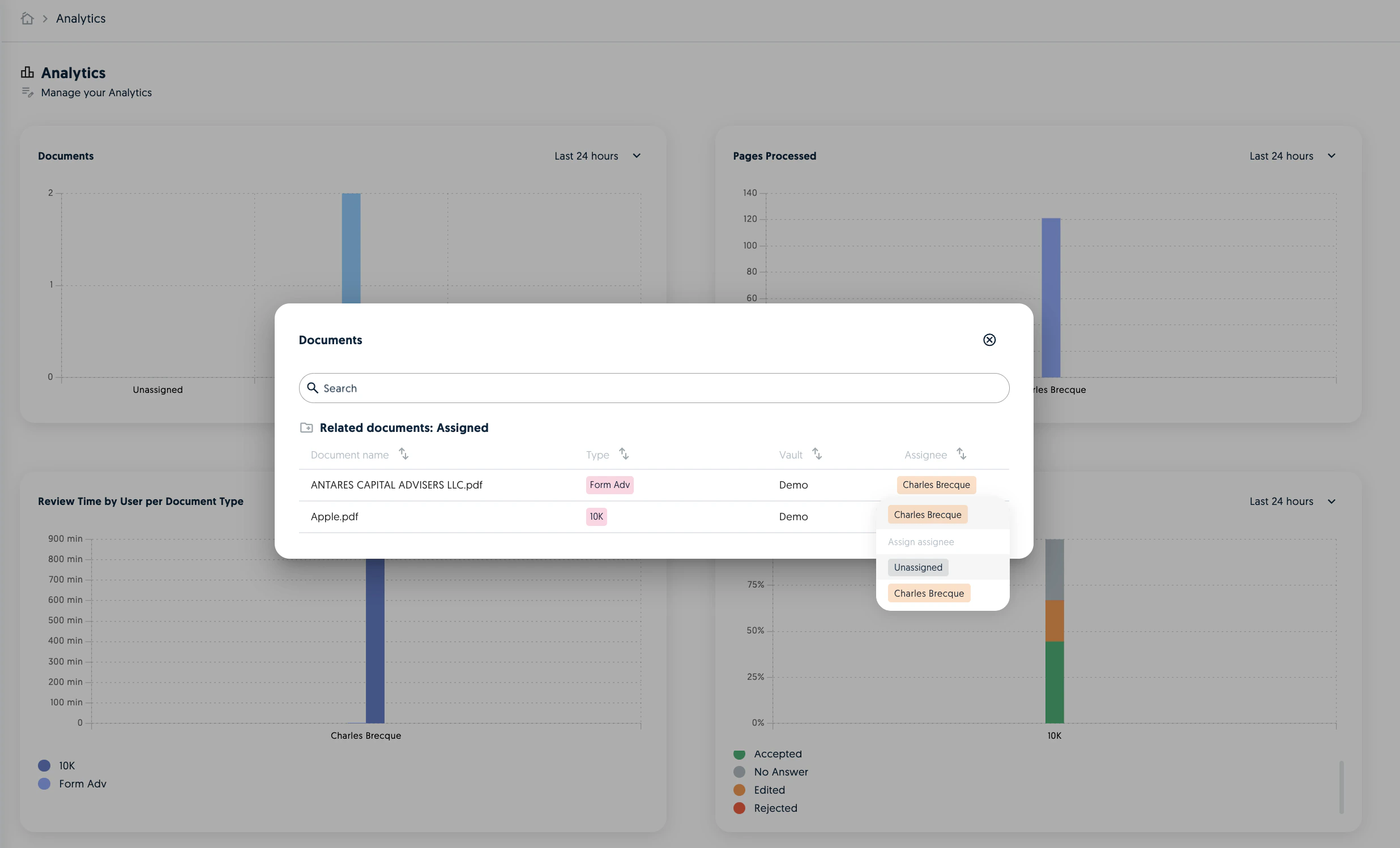
The Documents and Error charts also allow you to assign documents to users if required.
<img src="https://mintcdn.com/textmine/7TMdi9xcGt0Zk4KH/images/intercom/product-updates/19-january-2026/15-screenshot-2026-01-19-at-20-45-45.png?fit=max&auto=format&n=7TMdi9xcGt0Zk4KH&q=85&s=c69417aacd635f457a2eecf8220cc55d" alt="Screenshot" width="2472" height="1498" data-path="images/intercom/product-updates/19-january-2026/15-screenshot-2026-01-19-at-20-45-45.png" />

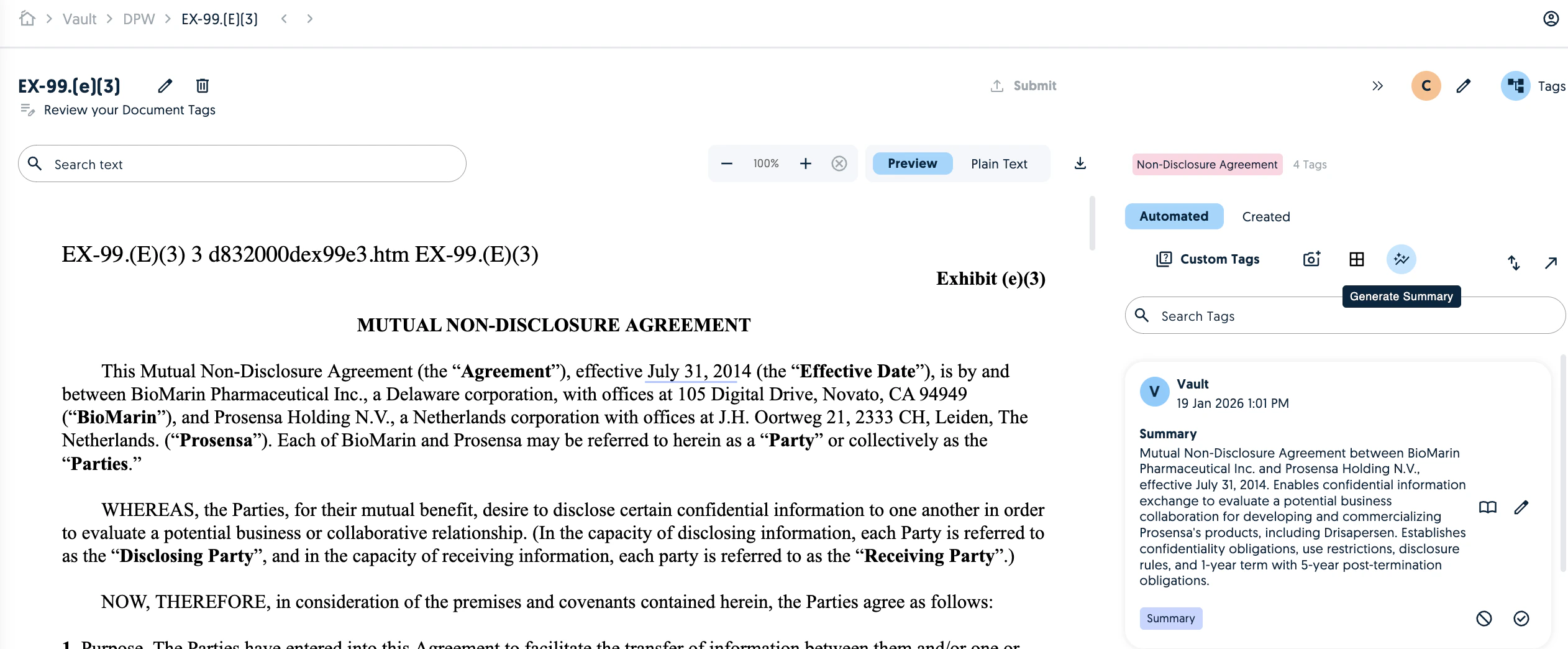
## Summary improvements

The summary functionality has been improved to offer more accurate and meaningful results.
<img src="https://mintcdn.com/textmine/7TMdi9xcGt0Zk4KH/images/intercom/product-updates/19-january-2026/16-screenshot-2026-01-19-at-13-14-37.png?fit=max&auto=format&n=7TMdi9xcGt0Zk4KH&q=85&s=8d895b65db3e183ecce2cf1a7e64a609" alt="Screenshot" width="2524" height="1044" data-path="images/intercom/product-updates/19-january-2026/16-screenshot-2026-01-19-at-13-14-37.png" />

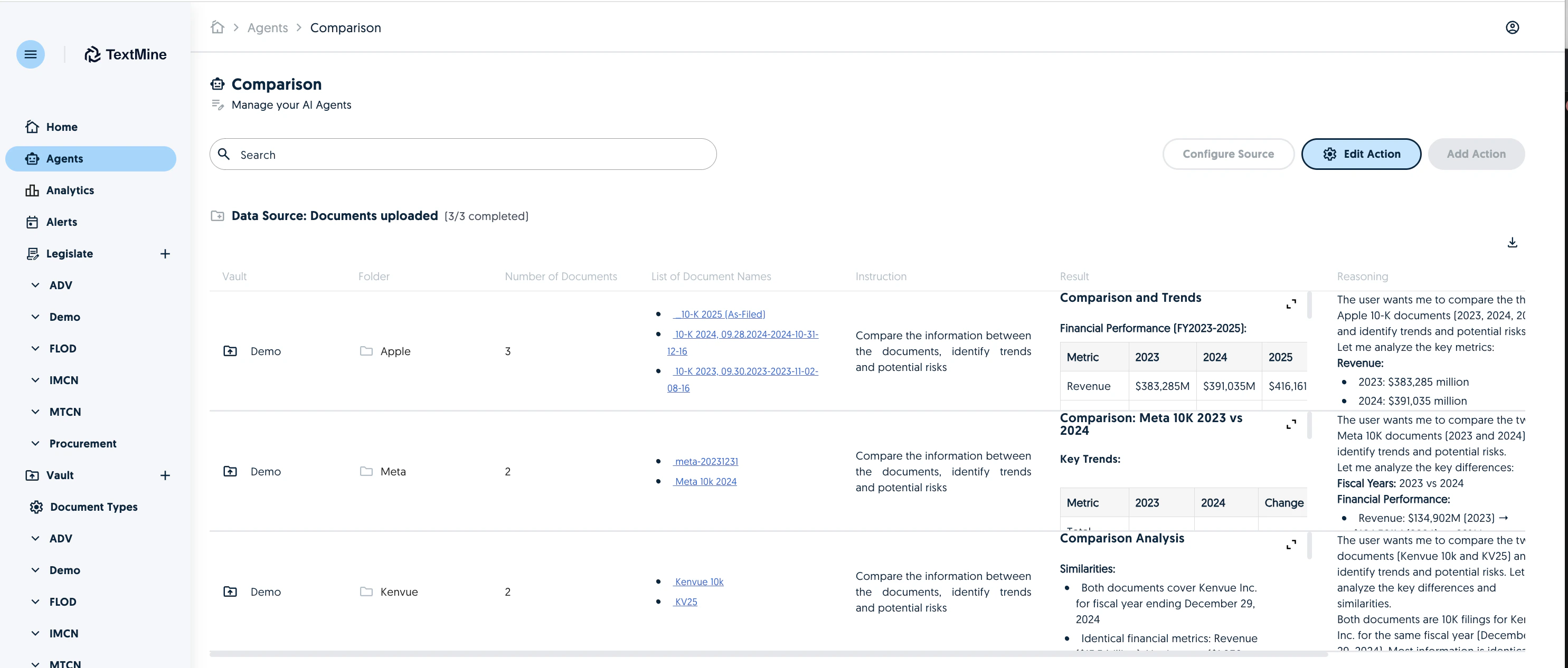
## Edit Agent Actions

You can now edit agent actions. Changing the action or instruction will reprocess the agent.
<img src="https://mintcdn.com/textmine/7TMdi9xcGt0Zk4KH/images/intercom/product-updates/19-january-2026/17-screenshot-2026-01-19-at-20-40-45.png?fit=max&auto=format&n=7TMdi9xcGt0Zk4KH&q=85&s=2a1f0452bf60c789dca44271058ea9df" alt="Screenshot" width="2970" height="1266" data-path="images/intercom/product-updates/19-january-2026/17-screenshot-2026-01-19-at-20-40-45.png" />