> ## Documentation Index
> Fetch the complete documentation index at: https://docs.textmine.com/llms.txt
> Use this file to discover all available pages before exploring further.

# 30 October 2025

> Sharepoint

<Note>
  This page was imported from Intercom and may describe older navigation or terminology. Source: [https://help.textmine.com/en/articles/12701080-30-october-2025](https://help.textmine.com/en/articles/12701080-30-october-2025)
</Note>

It is now possible to import files natively from Sharepoint. To do this you will need the following information about your Sharepoint from your Sharepoint/Azure administrator:

*

Client ID

*

Tenant ID

*

Client Secret

*

Site URL

You can save this details in the Vault Settings of the Vault you would like to connect to TextMine:
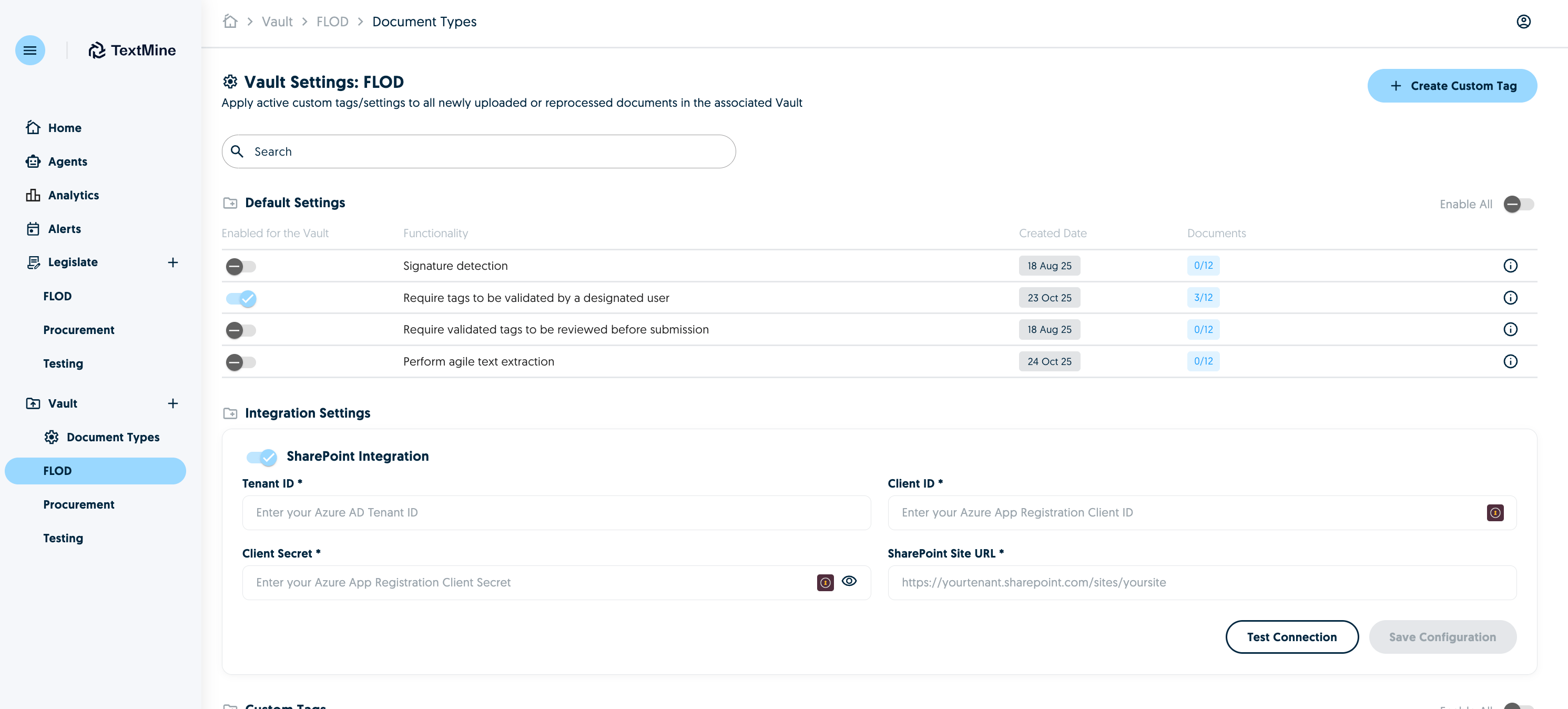
<img src="https://mintcdn.com/textmine/Wb04UT80sqhf9k3p/images/intercom/product-updates/30-october-2025/01-screenshot-2025-10-30-at-08-03-12.png?fit=max&auto=format&n=Wb04UT80sqhf9k3p&q=85&s=b143ead6aacb1c624b8c9ac3f5db1b71" alt="Screenshot" width="2982" height="1348" data-path="images/intercom/product-updates/30-october-2025/01-screenshot-2025-10-30-at-08-03-12.png" />

Test and then save the configuration.

<img src="https://mintcdn.com/textmine/Wb04UT80sqhf9k3p/images/intercom/product-updates/30-october-2025/02-screenshot-2025-10-30-at-08-35-10.png?fit=max&auto=format&n=Wb04UT80sqhf9k3p&q=85&s=29c5cb8fbc5f1a4553ebfc1aac88e6f7" alt="Screenshot" width="2488" height="628" data-path="images/intercom/product-updates/30-october-2025/02-screenshot-2025-10-30-at-08-35-10.png" />

This will then link the Sharepoint with this Vault meaning you'll be able to import files from Sharepoint into this Vault.

To do this, click upload document and select use an integration.
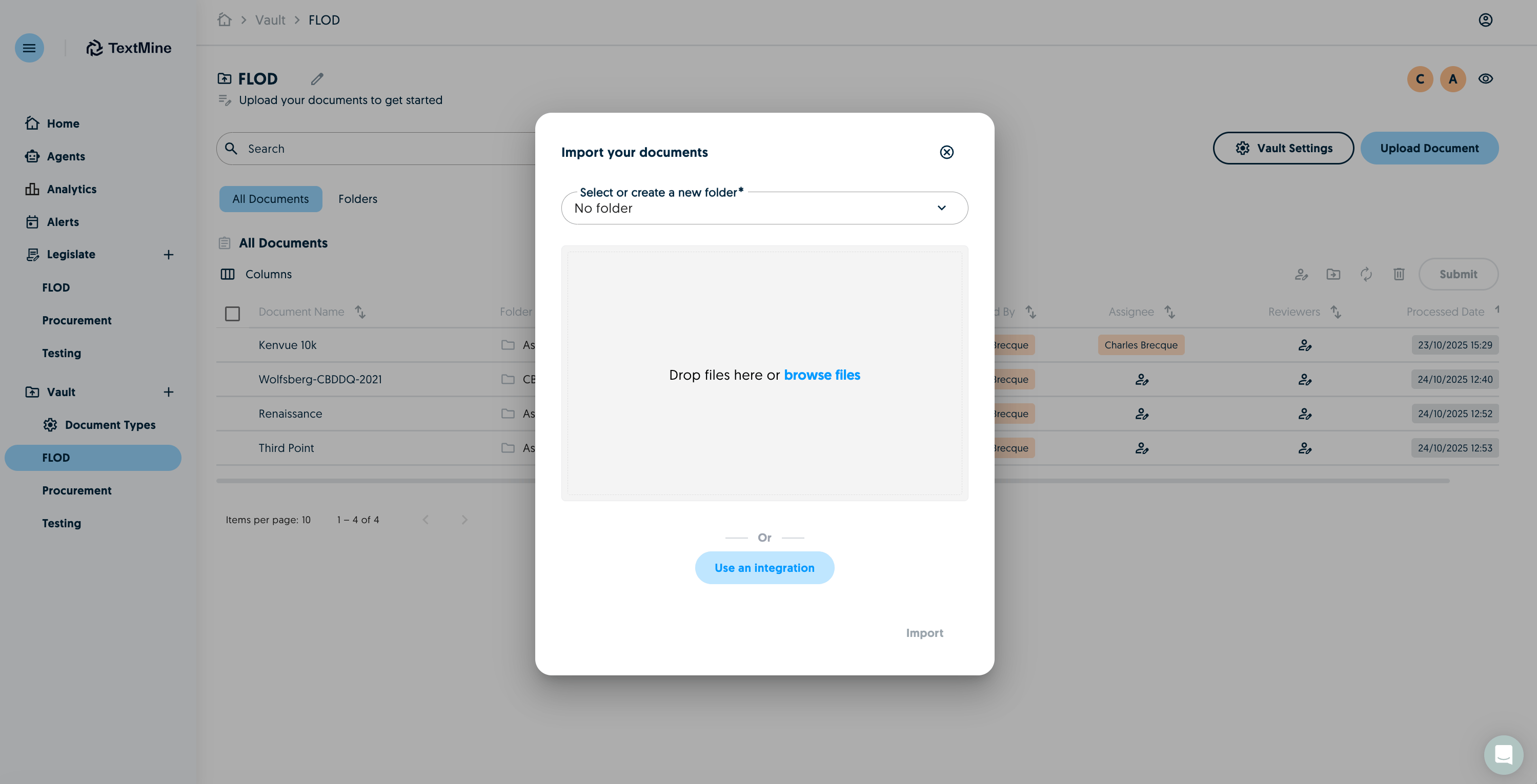
<img src="https://mintcdn.com/textmine/Wb04UT80sqhf9k3p/images/intercom/product-updates/30-october-2025/03-screenshot-2025-10-30-at-08-35-25.png?fit=max&auto=format&n=Wb04UT80sqhf9k3p&q=85&s=eab3c1ed380f15a30d0becf2ab3d3fd9" alt="Screenshot" width="2998" height="1530" data-path="images/intercom/product-updates/30-october-2025/03-screenshot-2025-10-30-at-08-35-25.png" />

The Sharepoint option will appear if the settings have been configured.
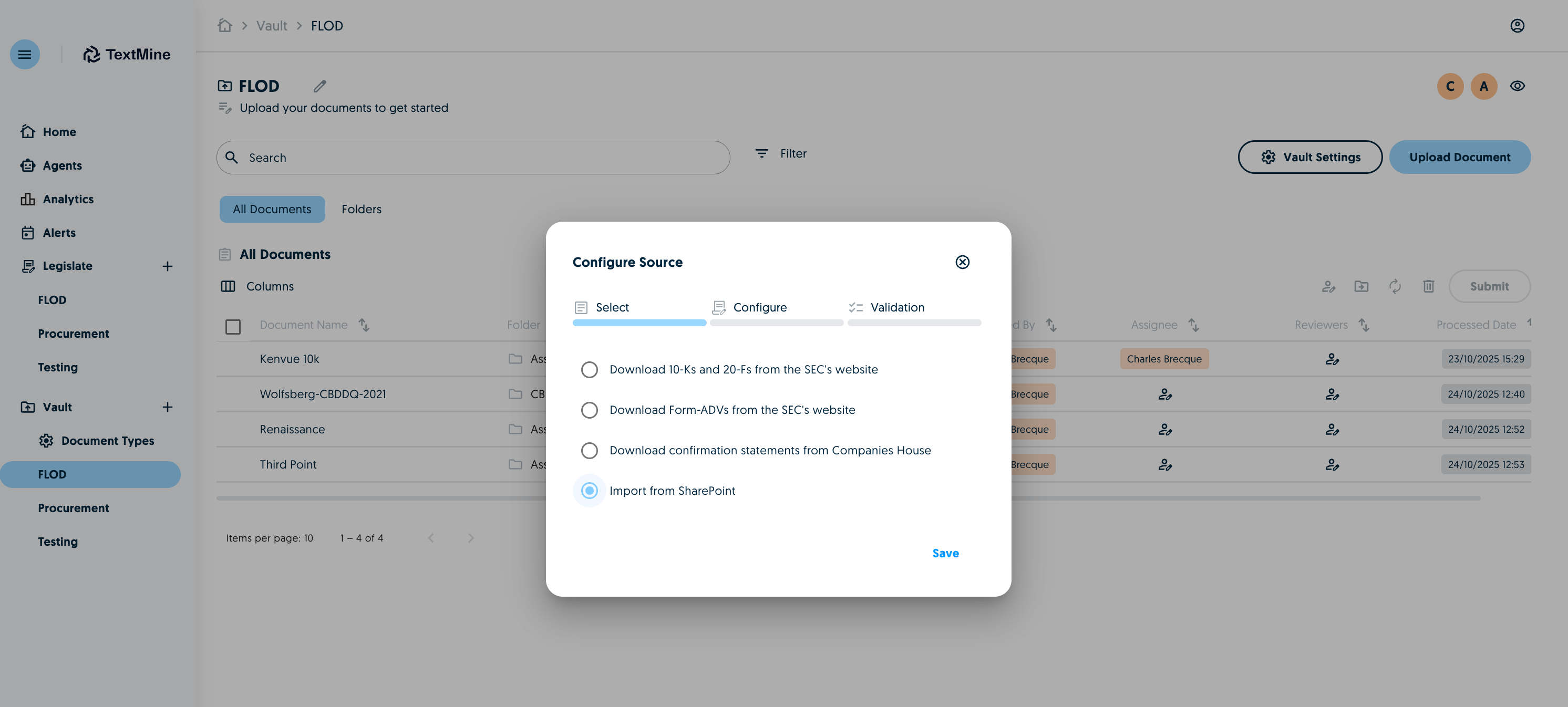
<img src="https://mintcdn.com/textmine/Wb04UT80sqhf9k3p/images/intercom/product-updates/30-october-2025/04-screenshot-2025-10-30-at-08-35-34.png?fit=max&auto=format&n=Wb04UT80sqhf9k3p&q=85&s=107e2ad6c94d338dfbf41b3f099fba84" alt="Screenshot" width="2984" height="1346" data-path="images/intercom/product-updates/30-october-2025/04-screenshot-2025-10-30-at-08-35-34.png" />

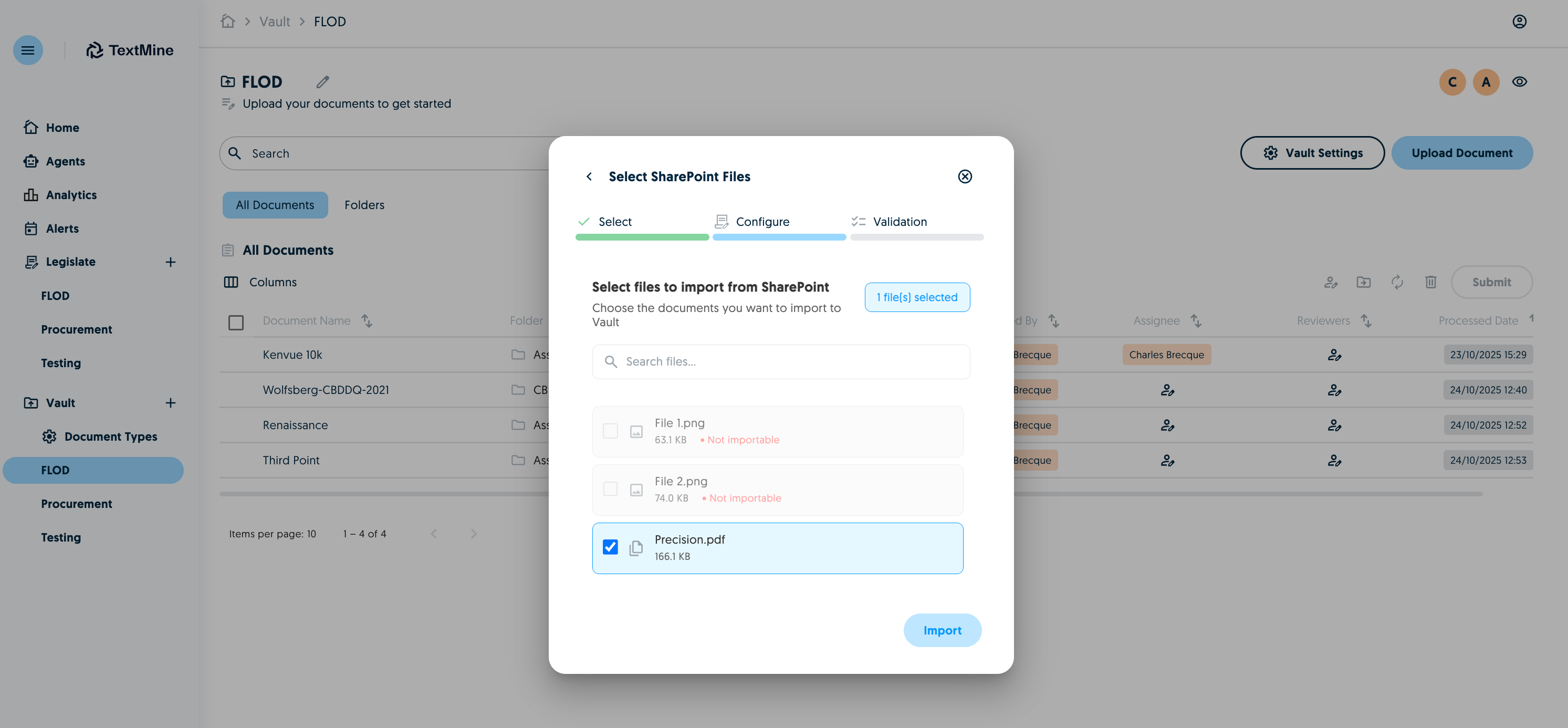
Select which documents you would like to import:
<img src="https://mintcdn.com/textmine/Wb04UT80sqhf9k3p/images/intercom/product-updates/30-october-2025/05-screenshot-2025-10-30-at-08-35-47.png?fit=max&auto=format&n=Wb04UT80sqhf9k3p&q=85&s=bbe87ad36fbdc2446eeafc1697a16952" alt="Screenshot" width="2986" height="1386" data-path="images/intercom/product-updates/30-october-2025/05-screenshot-2025-10-30-at-08-35-47.png" />

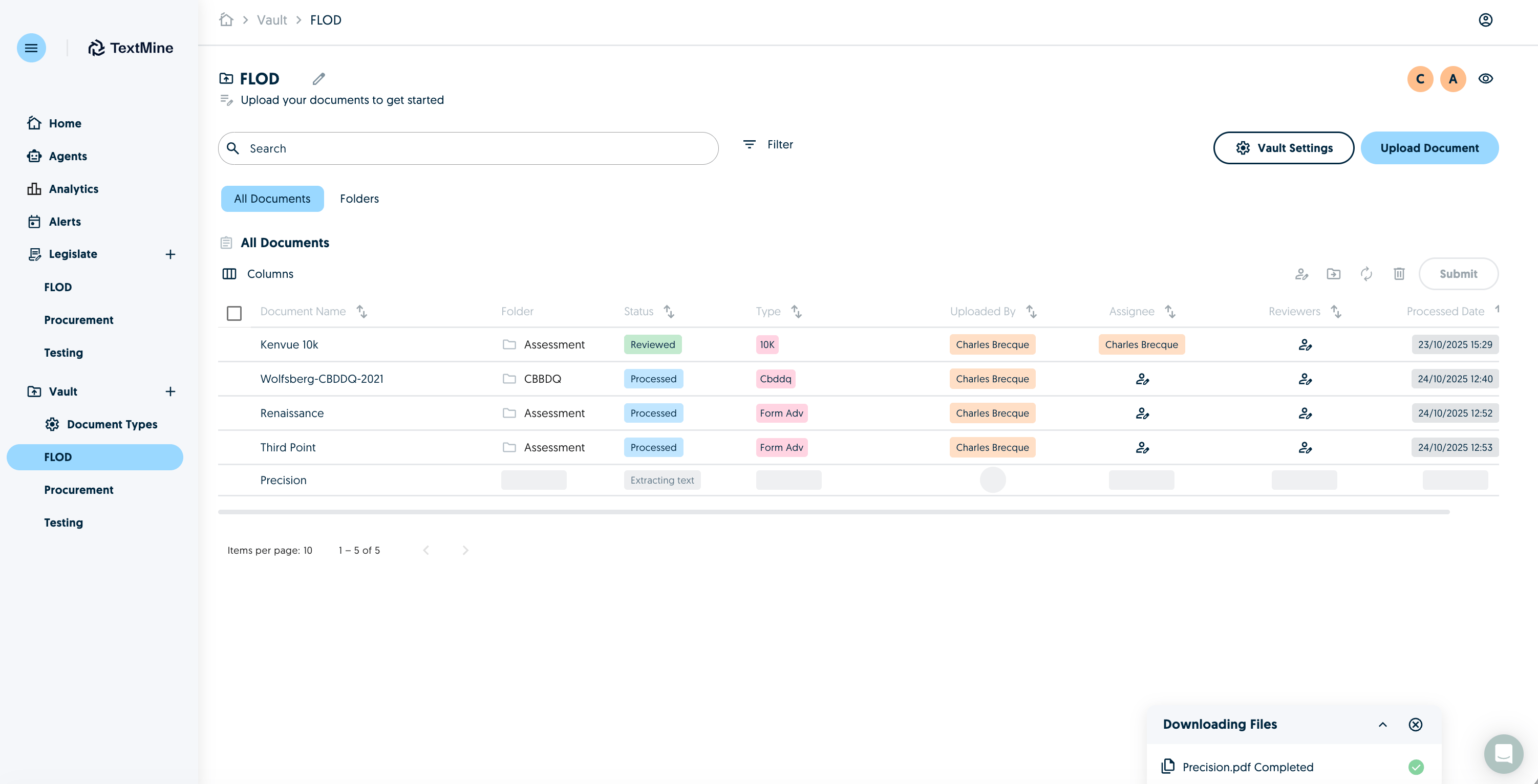
Documents will then be imported into the Vault and go through the usual extraction process.
<img src="https://mintcdn.com/textmine/Wb04UT80sqhf9k3p/images/intercom/product-updates/30-october-2025/06-screenshot-2025-10-30-at-08-36-04.png?fit=max&auto=format&n=Wb04UT80sqhf9k3p&q=85&s=6d723ea636a0ee8d1973c3eb27661680" alt="Screenshot" width="3004" height="1532" data-path="images/intercom/product-updates/30-october-2025/06-screenshot-2025-10-30-at-08-36-04.png" />