Learn how to use TextMine Workbench to ask questions, inspect Vault documents, import files, create reports, run agents, and save reusable artifacts.
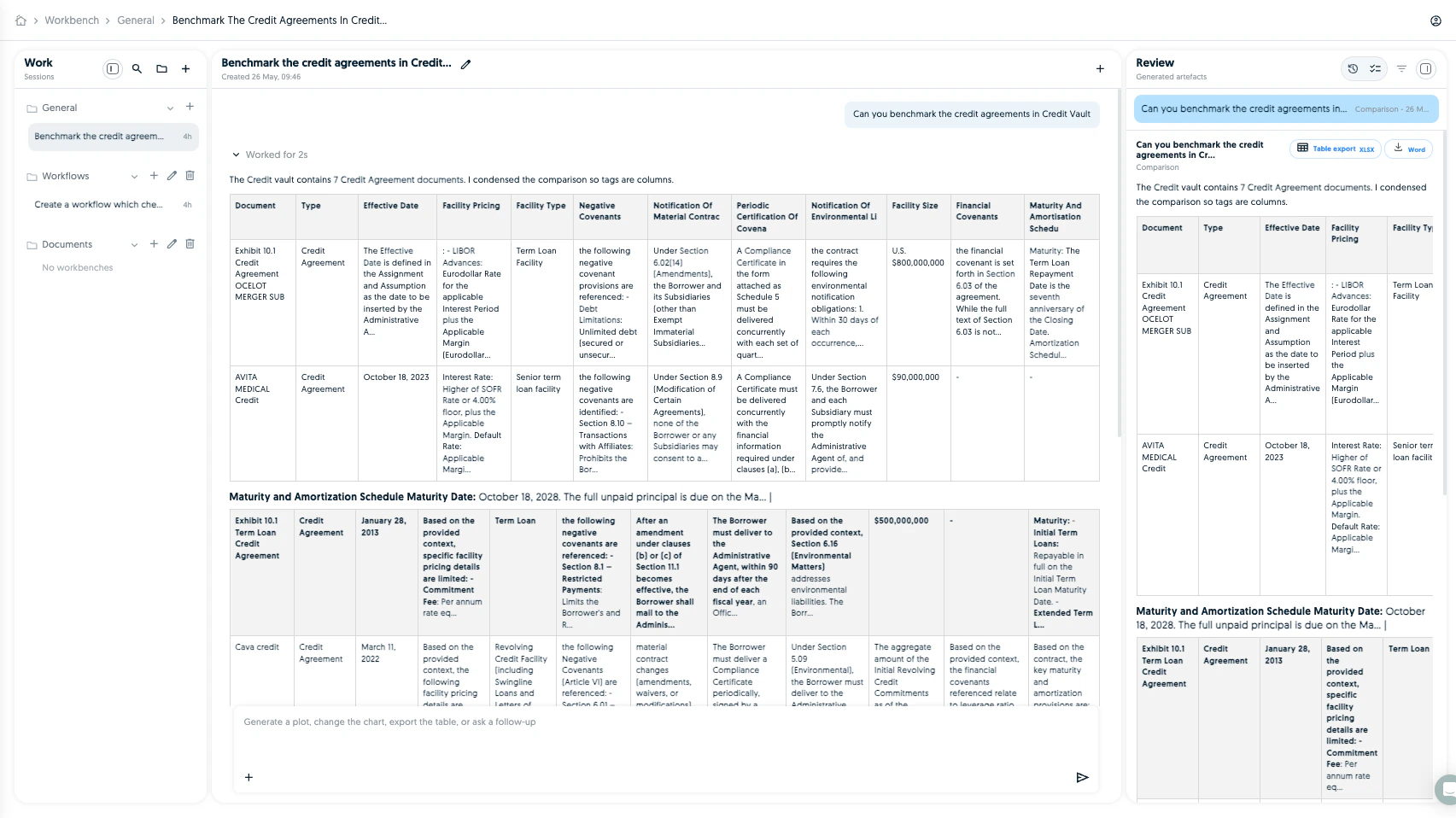
Workbench is the AI workspace for getting work done across TextMine. It can answer questions, inspect Vault documents, import files, create reports, run agents, create and run workflows, apply playbooks, update records, fill templates, and save reusable artifacts.For the full backend capability reference, see Workbench capabilities.
Search accessible Vaults and return document or tag tables.
Keep follow-up work scoped to the selected Vault, folder, document set, uploaded file, provider import, or previous result unless the user asks to broaden it.
Read Legislate team-document inventory when the user asks about published Legislate documents.
Ask Vault questions using documents, extracted tags, and uploaded reference files.
Analyze uploaded files as temporary context without requiring Vault processing.
Import uploaded files into a Vault when approved.
Browse and import files from enabled MCP providers such as connected storage systems.
Create reports, workflows, playbooks, document types, tags, agents, records, and record schemas.
Run existing workflows, playbooks, agents, table extraction, entity extraction, and document reprocessing.
Use Workbench when the answer is not just “open this page and click a button”. It is best for multi-step work, exploratory analysis, document comparison, one-off report generation, and drafting reusable automation.For straightforward document review, start in Vault. For a repeatable process, create a Workflow. For reusable review rules, create a Playbook.
Workbench is the in-app agentic workspace. It is the right place for a human to supervise analysis, review generated outputs, approve Vault changes, and turn one-off work into reusable workflows or playbooks.External agents should not guess Workbench internals from the UI. They should use:
API and developer docs for Public API V3 reference, examples, MCP setup, and exact operation IDs.
When an external agent needs to modify TextMine state, prefer the API or MCP tool that represents the product action directly. Use Workbench when a person needs to collaborate with the model, inspect intermediate reasoning, upload ad hoc files, or approve a change before it becomes durable.
{"docsConfig":{"theme":"mint","$schema":"https://mintlify.com/docs.json","name":"TextMine Help Center","description":"Self-service help for TextMine Workbench, Vault, workflows, records, integrations, permissions, product updates, and agent/API setup.","colors":{"primary":"#0066CC","light":"#3399FF","dark":"#80CDFF"},"logo":{"light":"https://app.textmine.com/assets/text-mine-logo.svg","dark":"https://app.textmine.com/assets/text-mine-logo.svg","href":"https://www.textmine.com"},"favicon":"https://app.textmine.com/favicon.ico","footer":{"links":[{"header":"For agents","items":[{"label":"Agent guide","href":"https://docs.textmine.com/getting-started/for-agents"},{"label":"Developer docs","href":"https://developers.textmine.com/docs/for-agents"},{"label":"Open in ChatGPT","href":"https://chatgpt.com/?q=Use%20TextMine%27s%20agent%20guide%20at%20https%3A%2F%2Fdocs.textmine.com%2Fgetting-started%2Ffor-agents%20and%20developer%20agent%20docs%20at%20https%3A%2F%2Fdevelopers.textmine.com%2Fdocs%2Ffor-agents.%20Help%20me%20choose%20the%20right%20TextMine%20surface%2C%20API%2C%20MCP%20tool%2C%20or%20Zapier%20setup%20for%20my%20task."},{"label":"Open in Claude","href":"https://claude.ai/new?q=Use%20TextMine%27s%20agent%20guide%20at%20https%3A%2F%2Fdocs.textmine.com%2Fgetting-started%2Ffor-agents%20and%20developer%20agent%20docs%20at%20https%3A%2F%2Fdevelopers.textmine.com%2Fdocs%2Ffor-agents.%20Help%20me%20choose%20the%20right%20TextMine%20surface%2C%20API%2C%20MCP%20tool%2C%20or%20Zapier%20setup%20for%20my%20task."},{"label":"Open in Perplexity","href":"https://www.perplexity.ai/search/new?q=Use%20TextMine%27s%20agent%20guide%20at%20https%3A%2F%2Fdocs.textmine.com%2Fgetting-started%2Ffor-agents%20and%20developer%20agent%20docs%20at%20https%3A%2F%2Fdevelopers.textmine.com%2Fdocs%2Ffor-agents.%20Help%20me%20choose%20the%20right%20TextMine%20surface%2C%20API%2C%20MCP%20tool%2C%20or%20Zapier%20setup%20for%20my%20task."}]}]},"search":{"prompt":"Search the TextMine Help Center for Workbench, Vault, workflows, records, integrations, permissions, product updates, or agent and API setup."},"seo":{"metatags":{"canonical":"https://docs.textmine.com","og:title":"TextMine Help Center","og:description":"Self-service help for TextMine Workbench, Vault, workflows, records, integrations, permissions, product updates, and agent/API setup.","twitter:title":"TextMine Help Center","twitter:description":"Self-service help for TextMine Workbench, Vault, workflows, records, integrations, permissions, product updates, and agent/API setup."},"indexing":"all"},"styling":{"eyebrows":"breadcrumbs","latex":false},"contextual":{"options":["chatgpt","claude","perplexity","copy","view"],"display":"header"},"interaction":{"drilldown":true},"metadata":{"timestamp":true},"navigation":{"pages":[]}},"deployment":{"deploymentMetadataValue":{"subdomain":"textmine","hasAudioNarration":false,"actualSubdomain":"textmine","customDomains":["docs.textmine.com"],"gitSource":{"type":"github","owner":"txmltd","repo":"textmine-docs","deployBranch":"main","contentDirectory":"","isPrivate":false,"mountPath":"","label":""},"chroma":{"liveDeploymentHistoryId":"6ab1a6242caf38440b9c5899","collectionId":"4054f7fc-f8cc-4d5c-890a-77fbc95719b0","schemaVersion":"v3","latestBuiltDeploymentHistoryId":"6ab1a6242caf38440b9c5899"},"feedback":{"thumbs":true,"issues":true,"agentFeedback":true},"entitlements":{"AI_CHAT":{"status":"DISABLED"}},"buildId":"6ab1a6242caf38440b9c5899","clientVersion":"0.0.3894","searchFilterCounts":[{"language":"default","tag":"Manage documents and data","count":14},{"language":"default","tag":"Automate work","count":11},{"language":"default","tag":"Connect TextMine","count":11},{"language":"default","tag":"Admin and updates","count":8},{"language":"default","tag":"Vault","count":6},{"language":"default","tag":"Workflows","count":6},{"language":"default","tag":"Start here","count":5},{"language":"default","tag":"Release notes","count":5},{"language":"default","tag":"Use Workbench","count":4},{"language":"default","tag":"Playbooks","count":3}]},"assistantConfig":{"enableAskAiButton":false,"enableStarterQuestions":true,"enableContextualStarterQuestions":true,"enableAskAiSearchBar":true,"deflection":{"enabled":true,"email":"support@textmine.com","showHelpButton":true}},"hasChatPermissions":false,"hasWebMcpPermissions":false,"toggles":[{"name":"kill-isr","enabled":true,"variant":{"name":"disabled","enabled":false,"feature_enabled":true},"impressionData":false},{"name":"agent-mintlify-slack","enabled":true,"variant":{"name":"disabled","enabled":false,"feature_enabled":true},"impressionData":false},{"name":"editor-v7-file-tree","enabled":true,"variant":{"name":"disabled","enabled":false,"feature_enabled":true},"impressionData":false},{"name":"agent-integrations-settings","enabled":true,"variant":{"name":"disabled","enabled":false,"feature_enabled":true},"impressionData":false},{"name":"automations-pr-grouping","enabled":true,"variant":{"name":"disabled","enabled":false,"feature_enabled":true},"impressionData":false},{"name":"custom-prefix","enabled":true,"variant":{"name":"disabled","enabled":false,"feature_enabled":true},"impressionData":false},{"name":"analytics-v7","enabled":true,"variant":{"name":"disabled","enabled":false,"feature_enabled":true},"impressionData":false},{"name":"user-flows-analytics","enabled":true,"variant":{"name":"disabled","enabled":false,"feature_enabled":true},"impressionData":false},{"name":"no-publish-flow","enabled":true,"variant":{"name":"disabled","enabled":false,"feature_enabled":true},"impressionData":false},{"name":"workos-onboarding","enabled":true,"variant":{"name":"disabled","enabled":false,"feature_enabled":true},"impressionData":false},{"name":"llms-txt-v2","enabled":true,"variant":{"name":"disabled","enabled":false,"feature_enabled":true},"impressionData":false},{"name":"pause-universal-search-reconcile","enabled":true,"variant":{"name":"disabled","enabled":false,"feature_enabled":true},"impressionData":false},{"name":"snapshot-serving-live","enabled":true,"variant":{"name":"disabled","enabled":false,"feature_enabled":true},"impressionData":false},{"name":"stripTemperatureMiddleware","enabled":true,"variant":{"name":"disabled","enabled":false,"feature_enabled":true},"impressionData":false},{"name":"per-site-search-delta","enabled":true,"variant":{"name":"disabled","enabled":false,"feature_enabled":true},"impressionData":false},{"name":"support-platform-pylon-zendesk","enabled":true,"variant":{"name":"disabled","enabled":false,"feature_enabled":true},"impressionData":false},{"name":"editor-branches-v2-autocommit","enabled":true,"variant":{"name":"disabled","enabled":false,"feature_enabled":true},"impressionData":false},{"name":"editor-branches-v2","enabled":true,"variant":{"name":"disabled","enabled":false,"feature_enabled":true},"impressionData":false},{"name":"snapshot-serving","enabled":true,"variant":{"name":"disabled","enabled":false,"feature_enabled":true},"impressionData":false},{"name":"instant-rollback","enabled":true,"variant":{"name":"disabled","enabled":false,"feature_enabled":true},"impressionData":false},{"name":"granular-notifications-server","enabled":true,"variant":{"name":"disabled","enabled":false,"feature_enabled":true},"impressionData":false},{"name":"granular-notifications","enabled":true,"variant":{"name":"disabled","enabled":false,"feature_enabled":true},"impressionData":false},{"name":"editor-private-page-search","enabled":true,"variant":{"name":"disabled","enabled":false,"feature_enabled":true},"impressionData":false},{"name":"automations-fable","enabled":true,"variant":{"name":"disabled","enabled":false,"feature_enabled":true},"impressionData":false},{"name":"fixed-ai-action-pricing","enabled":true,"variant":{"name":"disabled","enabled":false,"feature_enabled":true},"impressionData":false},{"name":"automation-resolve-merge-conflict","enabled":true,"variant":{"name":"disabled","enabled":false,"feature_enabled":true},"impressionData":false},{"name":"scoped-publishing","enabled":true,"variant":{"name":"disabled","enabled":false,"feature_enabled":true},"impressionData":false},{"name":"mintql","enabled":true,"variant":{"name":"disabled","enabled":false,"feature_enabled":true},"impressionData":false},{"name":"page-level-analytics","enabled":true,"variant":{"name":"disabled","enabled":false,"feature_enabled":true},"impressionData":false},{"name":"teamspace","enabled":true,"variant":{"name":"disabled","enabled":false,"feature_enabled":true},"impressionData":false},{"name":"editor-version-history-v2","enabled":true,"variant":{"name":"disabled","enabled":false,"feature_enabled":true},"impressionData":false},{"name":"vite-origin","enabled":true,"variant":{"name":"disabled","enabled":false,"feature_enabled":true},"impressionData":false},{"name":"editor-nav-generations","enabled":true,"variant":{"name":"disabled","enabled":false,"feature_enabled":true},"impressionData":false},{"name":"workspace-projects","enabled":true,"variant":{"name":"disabled","enabled":false,"feature_enabled":true},"impressionData":false},{"name":"assistant-v5","enabled":true,"variant":{"name":"disabled","enabled":false,"feature_enabled":true},"impressionData":false},{"name":"byok-sep-25","enabled":true,"variant":{"name":"disabled","enabled":false,"feature_enabled":true},"impressionData":false},{"name":"revalidation-jwt","enabled":true,"variant":{"name":"disabled","enabled":false,"feature_enabled":true},"impressionData":false},{"name":"editor-agent-model-picker","enabled":true,"variant":{"name":"disabled","enabled":false,"feature_enabled":true},"impressionData":false},{"name":"client-snapshot-docs-config","enabled":true,"variant":{"name":"disabled","enabled":false,"feature_enabled":true},"impressionData":false},{"name":"hobby-abuse-scan","enabled":true,"variant":{"name":"disabled","enabled":false,"feature_enabled":true},"impressionData":false}],"isAtlas":false,"googleFontsInlined":false},"customCss":[],"page":{"pagePath":"workbench/overview","slug":"/workbench/overview","pageMetadata":{"title":"Workbench overview","description":"Learn how to use TextMine Workbench to ask questions, inspect Vault documents, import files, create reports, run agents, and save reusable artifacts.","href":"/workbench/overview"},"description":{"compiledSource":"\"use strict\";\nconst {jsx: _jsx} = arguments[0];\nconst {useMDXComponents: _provideComponents} = arguments[0];\nfunction _createMdxContent(props) {\n const _components = {\n p: \"p\",\n ..._provideComponents(),\n ...props.components\n };\n return _jsx(_components.p, {\n children: \"Learn how to use TextMine Workbench to ask questions, inspect Vault documents, import files, create reports, run agents, and save reusable artifacts.\"\n });\n}\nfunction MDXContent(props = {}) {\n const {wrapper: MDXLayout} = {\n ..._provideComponents(),\n ...props.components\n };\n return MDXLayout ? _jsx(MDXLayout, {\n ...props,\n children: _jsx(_createMdxContent, {\n ...props\n })\n }) : _createMdxContent(props);\n}\nreturn {\n default: MDXContent\n};\n","frontmatter":{},"scope":{}},"pageType":"default","mdx":{"mdxSource":{"compiledSource":"\"use strict\";const{Fragment:_Fragment,jsx:_jsx,jsxs:_jsxs}=arguments[0];const{useMDXComponents:_provideComponents}=arguments[0];function _createMdxContent(props){const _components={a:`a`,li:`li`,p:`p`,ul:`ul`,..._provideComponents(),...props.components},{Heading,OptimizedImage}=_components;if(!Heading)_missingMdxReference(`Heading`,true);if(!OptimizedImage)_missingMdxReference(`OptimizedImage`,true);return _jsxs(_Fragment,{children:[_jsx(_components.p,{children:`Workbench is the AI workspace for getting work done across TextMine. It can answer questions, inspect Vault documents, import files, create reports, run agents, create and run workflows, apply playbooks, update records, fill templates, and save reusable artifacts.`}),`\n`,_jsxs(_components.p,{children:[`For the full backend capability reference, see `,_jsx(_components.a,{href:`/workbench/capabilities`,children:`Workbench capabilities`}),`.`]}),`\n`,_jsx(OptimizedImage,{src:`https://mintcdn.com/textmine/Wb04UT80sqhf9k3p/images/intercom/product-updates/26-may-2026/01-screenshot-2026-05-26-at-14-16-18.png?fit=max\u0026auto=format\u0026n=Wb04UT80sqhf9k3p\u0026q=85\u0026s=d6d7c9cd18e379c93e801b7813732da8`,alt:`TextMine Workbench screen showing an AI workspace for scoped document questions and reusable outputs`,\"data-og-width\":`1705`,width:`1705`,\"data-og-height\":`958`,height:`958`,\"data-path\":`images/intercom/product-updates/26-may-2026/01-screenshot-2026-05-26-at-14-16-18.png`,\"data-optimize\":`true`,\"data-opv\":`3`,srcset:`https://mintcdn.com/textmine/Wb04UT80sqhf9k3p/images/intercom/product-updates/26-may-2026/01-screenshot-2026-05-26-at-14-16-18.png?w=280\u0026fit=max\u0026auto=format\u0026n=Wb04UT80sqhf9k3p\u0026q=85\u0026s=950d9aa623abf93b62cfef569a384c40 280w, https://mintcdn.com/textmine/Wb04UT80sqhf9k3p/images/intercom/product-updates/26-may-2026/01-screenshot-2026-05-26-at-14-16-18.png?w=560\u0026fit=max\u0026auto=format\u0026n=Wb04UT80sqhf9k3p\u0026q=85\u0026s=bc1ea1356fb9156e1cfd274ee029cdac 560w, https://mintcdn.com/textmine/Wb04UT80sqhf9k3p/images/intercom/product-updates/26-may-2026/01-screenshot-2026-05-26-at-14-16-18.png?w=840\u0026fit=max\u0026auto=format\u0026n=Wb04UT80sqhf9k3p\u0026q=85\u0026s=9c86a288d7092a2a5fadc7191a7b3d01 840w, https://mintcdn.com/textmine/Wb04UT80sqhf9k3p/images/intercom/product-updates/26-may-2026/01-screenshot-2026-05-26-at-14-16-18.png?w=1100\u0026fit=max\u0026auto=format\u0026n=Wb04UT80sqhf9k3p\u0026q=85\u0026s=fa2b5d9080e2f195c92440a5f562c7ad 1100w, https://mintcdn.com/textmine/Wb04UT80sqhf9k3p/images/intercom/product-updates/26-may-2026/01-screenshot-2026-05-26-at-14-16-18.png?w=1650\u0026fit=max\u0026auto=format\u0026n=Wb04UT80sqhf9k3p\u0026q=85\u0026s=93955251c6d3656d8764ccf69cec9198 1650w, https://mintcdn.com/textmine/Wb04UT80sqhf9k3p/images/intercom/product-updates/26-may-2026/01-screenshot-2026-05-26-at-14-16-18.png?w=2500\u0026fit=max\u0026auto=format\u0026n=Wb04UT80sqhf9k3p\u0026q=85\u0026s=1c7f056893b1554d670381fd4e34cf8b 2500w`}),`\n`,_jsx(Heading,{level:`2`,id:`what-workbench-can-do`,children:`What Workbench can do`}),`\n`,_jsxs(_components.ul,{children:[`\n`,_jsx(_components.li,{children:`Inspect selected Vault documents before acting.`}),`\n`,_jsx(_components.li,{children:`Search accessible Vaults and return document or tag tables.`}),`\n`,_jsx(_components.li,{children:`Keep follow-up work scoped to the selected Vault, folder, document set, uploaded file, provider import, or previous result unless the user asks to broaden it.`}),`\n`,_jsx(_components.li,{children:`Read Legislate team-document inventory when the user asks about published Legislate documents.`}),`\n`,_jsx(_components.li,{children:`Ask Vault questions using documents, extracted tags, and uploaded reference files.`}),`\n`,_jsx(_components.li,{children:`Analyze uploaded files as temporary context without requiring Vault processing.`}),`\n`,_jsx(_components.li,{children:`Import uploaded files into a Vault when approved.`}),`\n`,_jsx(_components.li,{children:`Browse and import files from enabled MCP providers such as connected storage systems.`}),`\n`,_jsx(_components.li,{children:`Create reports, workflows, playbooks, document types, tags, agents, records, and record schemas.`}),`\n`,_jsx(_components.li,{children:`Run existing workflows, playbooks, agents, table extraction, entity extraction, and document reprocessing.`}),`\n`,_jsx(_components.li,{children:`Save final answers as Workbench artifacts.`}),`\n`]}),`\n`,_jsx(Heading,{level:`2`,id:`when-to-use-workbench`,children:`When to use Workbench`}),`\n`,_jsx(_components.p,{children:`Use Workbench when the answer is not just “open this page and click a button”. It is best for multi-step work, exploratory analysis, document comparison, one-off report generation, and drafting reusable automation.`}),`\n`,_jsx(_components.p,{children:`For straightforward document review, start in Vault. For a repeatable process, create a Workflow. For reusable review rules, create a Playbook.`}),`\n`,_jsx(Heading,{level:`2`,id:`workbench-and-agents`,children:`Workbench and agents`}),`\n`,_jsx(_components.p,{children:`Workbench is the in-app agentic workspace. It is the right place for a human to supervise analysis, review generated outputs, approve Vault changes, and turn one-off work into reusable workflows or playbooks.`}),`\n`,_jsx(_components.p,{children:`External agents should not guess Workbench internals from the UI. They should use:`}),`\n`,_jsxs(_components.ul,{children:[`\n`,_jsxs(_components.li,{children:[_jsx(_components.a,{href:`/getting-started/for-agents`,children:`For agents`}),` for product routing and terminology.`]}),`\n`,_jsxs(_components.li,{children:[_jsx(_components.a,{href:`/integrations/textmine-mcp-server`,children:`TextMine MCP server`}),` for direct TextMine tool access.`]}),`\n`,_jsxs(_components.li,{children:[_jsx(_components.a,{href:`/integrations/api-and-developer-docs`,children:`API and developer docs`}),` for Public API V3 reference, examples, MCP setup, and exact operation IDs.`]}),`\n`]}),`\n`,_jsx(_components.p,{children:`When an external agent needs to modify TextMine state, prefer the API or MCP tool that represents the product action directly. Use Workbench when a person needs to collaborate with the model, inspect intermediate reasoning, upload ad hoc files, or approve a change before it becomes durable.`}),`\n`,_jsx(Heading,{level:`2`,id:`common-patterns`,children:`Common patterns`}),`\n`,_jsxs(_components.ul,{children:[`\n`,_jsx(_components.li,{children:`Start with Workbench to explore a messy request, then save the repeatable parts as a workflow.`}),`\n`,_jsx(_components.li,{children:`Upload files into Workbench for temporary context, then import them into Vault only when they need durable processing and governance.`}),`\n`,_jsx(_components.li,{children:`Name the source scope in the prompt when it matters: a Vault, folder, selected documents, uploaded files, provider import, or previous table.`}),`\n`,_jsx(_components.li,{children:`Ask Workbench to use Legislate when the question is about validated, published document data.`}),`\n`,_jsx(_components.li,{children:`Use records when the answer should become structured business data rather than a one-off response.`}),`\n`]})]})}function MDXContent(props={}){const{wrapper:MDXLayout}={..._provideComponents(),...props.components};return MDXLayout?_jsx(MDXLayout,{...props,children:_jsx(_createMdxContent,{...props})}):_createMdxContent(props)}return{default:MDXContent};function _missingMdxReference(id,component){throw new Error(`Expected `+(component?`component`:`object`)+\" `\"+id+\"` to be defined: you likely forgot to import, pass, or provide it.\")}","frontmatter":{},"scope":{"config":{},"pageMetadata":{"title":"Workbench overview","description":"Learn how to use TextMine Workbench to ask questions, inspect Vault documents, import files, create reports, run agents, and save reusable artifacts.","href":"/workbench/overview"}}},"mdxSourceWithNoJs":null},"mdxExtracts":{"tableOfContents":[{"title":"What Workbench can do","slug":"what-workbench-can-do","depth":2,"children":[]},{"title":"When to use Workbench","slug":"when-to-use-workbench","depth":2,"children":[]},{"title":"Workbench and agents","slug":"workbench-and-agents","depth":2,"children":[]},{"title":"Common patterns","slug":"common-patterns","depth":2,"children":[]}],"codeExamples":{}},"jsLinks":[],"subdomain":"textmine","siteName":"TextMine Help Center","title":"TextMine Help Center","contextualStarterQuestions":[{"_id":"6a39791907d328bbfef96be8","deploymentId":"6a0f81da77ddd2145b4b7df2","questionText":"Can I run agents in Workbench?","status":"active","generatedBy":"contextual","path":"workbench/overview","createdAt":"2026-06-22T18:04:09.239Z","updatedAt":"2026-06-22T18:04:09.239Z","__v":0},{"_id":"6a39791907d328bbfef96be7","deploymentId":"6a0f81da77ddd2145b4b7df2","questionText":"How do I create reusable artifacts?","status":"active","generatedBy":"contextual","path":"workbench/overview","createdAt":"2026-06-22T18:04:09.239Z","updatedAt":"2026-06-22T18:04:09.239Z","__v":0},{"_id":"6a39791907d328bbfef96be6","deploymentId":"6a0f81da77ddd2145b4b7df2","questionText":"What can I do in Workbench?","status":"active","generatedBy":"contextual","path":"workbench/overview","createdAt":"2026-06-22T18:04:09.239Z","updatedAt":"2026-06-22T18:04:09.239Z","__v":0}],"navMaps":{"firstHrefInVersion":{},"firstHrefInLanguage":{}},"lastModified":"2026-06-22T18:03:58.788Z","gitLastModified":"2026-06-22T17:58:38.000Z","originalFileLocation":"workbench/overview.mdx"},"headHtml":"\u003cmeta data-mint-head name=\"description\" content=\"Learn how to use TextMine Workbench to ask questions, inspect Vault documents, import files, create reports, run agents, and save reusable artifacts.\">\u003cmeta data-mint-head name=\"application-name\" content=\"TextMine Help Center\">\u003cmeta data-mint-head name=\"generator\" content=\"Mintlify\">\u003clink data-mint-head rel=\"apple-touch-icon\" type=\"image/x-icon\" sizes=\"180x180\" href=\"https://app.textmine.com/favicon.ico\">\u003clink data-mint-head rel=\"icon\" type=\"image/x-icon\" sizes=\"32x32\" href=\"https://app.textmine.com/favicon.ico\">\u003clink data-mint-head rel=\"icon\" type=\"image/x-icon\" sizes=\"16x16\" href=\"https://app.textmine.com/favicon.ico\">\u003clink data-mint-head rel=\"shortcut icon\" type=\"image/x-icon\" href=\"https://app.textmine.com/favicon.ico\">\u003cmeta data-mint-head property=\"og:title\" content=\"TextMine Help Center\">\u003cmeta data-mint-head property=\"og:description\" content=\"Self-service help for TextMine Workbench, Vault, workflows, records, integrations, permissions, product updates, and agent/API setup.\">\u003cmeta data-mint-head property=\"og:site_name\" content=\"TextMine Help Center\">\u003cmeta data-mint-head property=\"og:url\" content=\"https://docs.textmine.com/workbench/overview\">\u003cmeta data-mint-head property=\"og:type\" content=\"website\">\u003cmeta data-mint-head name=\"twitter:card\" content=\"summary_large_image\">\u003cmeta data-mint-head name=\"twitter:title\" content=\"TextMine Help Center\">\u003cmeta data-mint-head name=\"twitter:description\" content=\"Self-service help for TextMine Workbench, Vault, workflows, records, integrations, permissions, product updates, and agent/API setup.\">\u003cmeta data-mint-head name=\"msapplication-config\" content=\"https://mintlify.s3.us-west-1.amazonaws.com/textmine/_generated/favicon/browserconfig.xml?v=3\">\u003cmeta data-mint-head name=\"apple-mobile-web-app-title\" content=\"TextMine Help Center\">\u003cmeta data-mint-head name=\"msapplication-TileColor\" content=\"#0066CC\">\u003clink data-mint-head rel=\"canonical\" href=\"https://docs.textmine.com/workbench/overview\">\u003clink data-mint-head rel=\"alternate\" type=\"application/xml\" href=\"/sitemap.xml\">\u003clink data-mint-head rel=\"alternate\" type=\"text/markdown\" href=\"/workbench/overview.md\">\u003cscript data-mint-head type=\"application/ld+json\">{\"@context\":\"https://schema.org\",\"@graph\":[{\"@type\":\"Organization\",\"@id\":\"https://docs.textmine.com/#organization\",\"name\":\"TextMine Help Center\",\"url\":\"https://docs.textmine.com\",\"logo\":{\"@type\":\"ImageObject\",\"url\":\"https://app.textmine.com/assets/text-mine-logo.svg\"}},{\"@type\":\"WebSite\",\"@id\":\"https://docs.textmine.com#website\",\"name\":\"TextMine Help Center\",\"url\":\"https://docs.textmine.com\",\"publisher\":{\"@id\":\"https://docs.textmine.com/#organization\"}},{\"@type\":\"WebPage\",\"@id\":\"https://docs.textmine.com/workbench/overview#webpage\",\"url\":\"https://docs.textmine.com/workbench/overview\",\"name\":\"Workbench overview\",\"description\":\"Learn how to use TextMine Workbench to ask questions, inspect Vault documents, import files, create reports, run agents, and save reusable artifacts.\",\"dateModified\":\"2026-06-22T17:58:38.000Z\",\"isPartOf\":{\"@id\":\"https://docs.textmine.com#website\"},\"breadcrumb\":{\"@id\":\"https://docs.textmine.com/workbench/overview#breadcrumb\"}},{\"@type\":\"BreadcrumbList\",\"@id\":\"https://docs.textmine.com/workbench/overview#breadcrumb\",\"itemListElement\":[{\"@type\":\"ListItem\",\"position\":1,\"name\":\"TextMine Help Center\",\"item\":\"https://docs.textmine.com\"},{\"@type\":\"ListItem\",\"position\":2,\"name\":\"Workbench overview\",\"item\":\"https://docs.textmine.com/workbench/overview\"}]},{\"@type\":[\"Article\",\"TechArticle\"],\"@id\":\"https://docs.textmine.com/workbench/overview#article\",\"headline\":\"Workbench overview\",\"name\":\"Workbench overview\",\"description\":\"Learn how to use TextMine Workbench to ask questions, inspect Vault documents, import files, create reports, run agents, and save reusable artifacts.\",\"url\":\"https://docs.textmine.com/workbench/overview\",\"mainEntityOfPage\":{\"@id\":\"https://docs.textmine.com/workbench/overview#webpage\"},\"dateModified\":\"2026-06-22T17:58:38.000Z\",\"publisher\":{\"@id\":\"https://docs.textmine.com/#organization\"},\"isPartOf\":{\"@id\":\"https://docs.textmine.com#website\"}}]}\u003c/script>\u003cscript data-mint-head type=\"application/ld+json\">{\"@context\":\"https://schema.org\",\"@type\":\"WebSite\",\"name\":\"TextMine Help Center\",\"creator\":{\"@type\":\"Organization\",\"name\":\"Mintlify\",\"url\":\"https://mintlify.com\"}}\u003c/script>","siteName":"TextMine Help Center","nav":{"global":null,"groups":[{"group":"Start here","pages":[{"title":"TextMine Help Center","href":"/index"},{"title":"Product map","href":"/getting-started/product-map"},{"title":"Quick start","href":"/getting-started/quick-start"},{"title":"Agents, Public API, and MCP","href":"/getting-started/for-agents"},{"title":"Contact support","description":"How to contact TextMine support and what to include so the team can route product, access, integration, billing, or workflow issues quickly.","href":"/support"}]},{"group":"Use Workbench","pages":[{"title":"Workbench overview","href":"/workbench/overview"},{"title":"Workbench capabilities","description":"Reference for what Workbench can read, create, run, import, and verify.","href":"/workbench/capabilities"},{"title":"Use files and integrations in Workbench","href":"/workbench/uploads-and-integrations"},{"title":"Goals, tasks, and artifacts","href":"/workbench/goals-tasks-and-artifacts"}]},{"group":"Manage documents and data","pages":[{"title":"Manage documents and data in TextMine","href":"/documents-and-data/index"},{"group":"Knowledge Bases","pages":[{"title":"Knowledge Bases overview","href":"/knowledge-bases/overview"}]},{"group":"Vault","pages":[{"title":"Vault overview","href":"/vault/overview"},{"title":"Vault and editor capabilities","href":"/vault/capabilities"},{"title":"Document types and tags","href":"/vault/document-types-and-tags"},{"title":"Explore documents","sidebarTitle":"Explore","href":"/vault/explore"},{"title":"Tags and extraction","href":"/vault/tags-and-extraction"},{"title":"Ask Vault and reports","href":"/vault/ask-vault-and-reports"}]},{"group":"Legislate","pages":[{"title":"Legislate overview","href":"/legislate/overview"}]},{"group":"Records","pages":[{"title":"Records overview","href":"/records/overview"},{"title":"Schemas and review candidates","href":"/records/schemas-and-candidates"},{"title":"Ask, graph, and enrich records","href":"/records/ask-graph-and-enrichment"}]},{"group":"Reports and exports","pages":[{"title":"Reports and exports","href":"/reports-and-exports/overview"}]},{"group":"Scribe","pages":[{"title":"Scribe overview","href":"/scribe/overview"}]}]},{"group":"Automate work","pages":[{"title":"Automate work in TextMine","href":"/automation/index"},{"group":"Workflows","pages":[{"title":"Workflows overview","href":"/workflows/overview"},{"title":"Workflow blocks","href":"/workflows/blocks"},{"title":"Workflow examples","href":"/workflows/examples"},{"title":"Create a workflow","href":"/workflows/create-a-workflow"},{"title":"Email, intake forms, and approvals","href":"/workflows/email-intake-and-approvals"},{"title":"Records and integrations in workflows","href":"/workflows/records-and-integrations"}]},{"group":"Playbooks","pages":[{"title":"Playbooks overview","href":"/playbooks/overview"},{"title":"Create and run a playbook","href":"/playbooks/create-and-run"},{"title":"Playbook analytics","href":"/playbooks/analytics"}]},{"group":"Agents","pages":[{"title":"Agents overview","href":"/agents/overview"}]}]},{"group":"Connect TextMine","pages":[{"title":"Integrations overview","href":"/integrations/overview"},{"title":"Agent self-service signup","sidebarTitle":"Agent self-serve","href":"/integrations/third-party-agent-signup"},{"title":"Integration catalog","href":"/integrations/catalog"},{"title":"Workbench MCP providers","href":"/integrations/workbench-mcp-providers"},{"title":"TextMine MCP server","href":"/integrations/textmine-mcp-server"},{"title":"Slack","sidebarTitle":"Slack","href":"/integrations/slack"},{"title":"Set up TextMine in Copilot Studio","href":"/integrations/copilot-studio"},{"title":"TextMine CLI","sidebarTitle":"TextMine CLI","href":"/integrations/textmine-cli"},{"title":"CLI quickstart","sidebarTitle":"CLI quickstart","href":"/integrations/cli-quickstart"},{"title":"API and developer docs","href":"/integrations/api-and-developer-docs"},{"title":"Zapier","sidebarTitle":"Zapier","href":"/integrations/zapier"}]},{"group":"Admin and updates","pages":[{"title":"Manage TextMine access and updates","href":"/admin-and-updates/index"},{"group":"Administration","pages":[{"title":"Permissions and feature access","href":"/administration/permissions"}]},{"group":"Release notes","pages":[{"title":"Release notes","href":"/release-notes/index"},{"title":"21 September 2026","href":"/release-notes/21-september-2026"},{"title":"25 June 2026","href":"/release-notes/25-june-2026"},{"title":"15 June 2026","href":"/release-notes/15-june-2026"},{"title":"7 June 2026","href":"/release-notes/7-june-2026"}]},{"group":"Archive","pages":[{"title":"Intercom archive","href":"/archive/intercom/index"}]}]}]},"title":"TextMine Help Center","buildId":"dpl_8LJVMfxYNq6LJkohTrn2iyWT8umj","deploymentId":"dpl_8LJVMfxYNq6LJkohTrn2iyWT8umj","dynamics":["a74be98ba7"],"chunks":["zoom-image-lightbox-D9lJgLSo.js","PlusIcon-C1lem43w.js","lightbox-handle-r17bVUz3.js"]}