Learn how TextMine playbooks apply reusable document review rules, checklists, negotiation guidance, analytics, and structured findings to Vault documents.
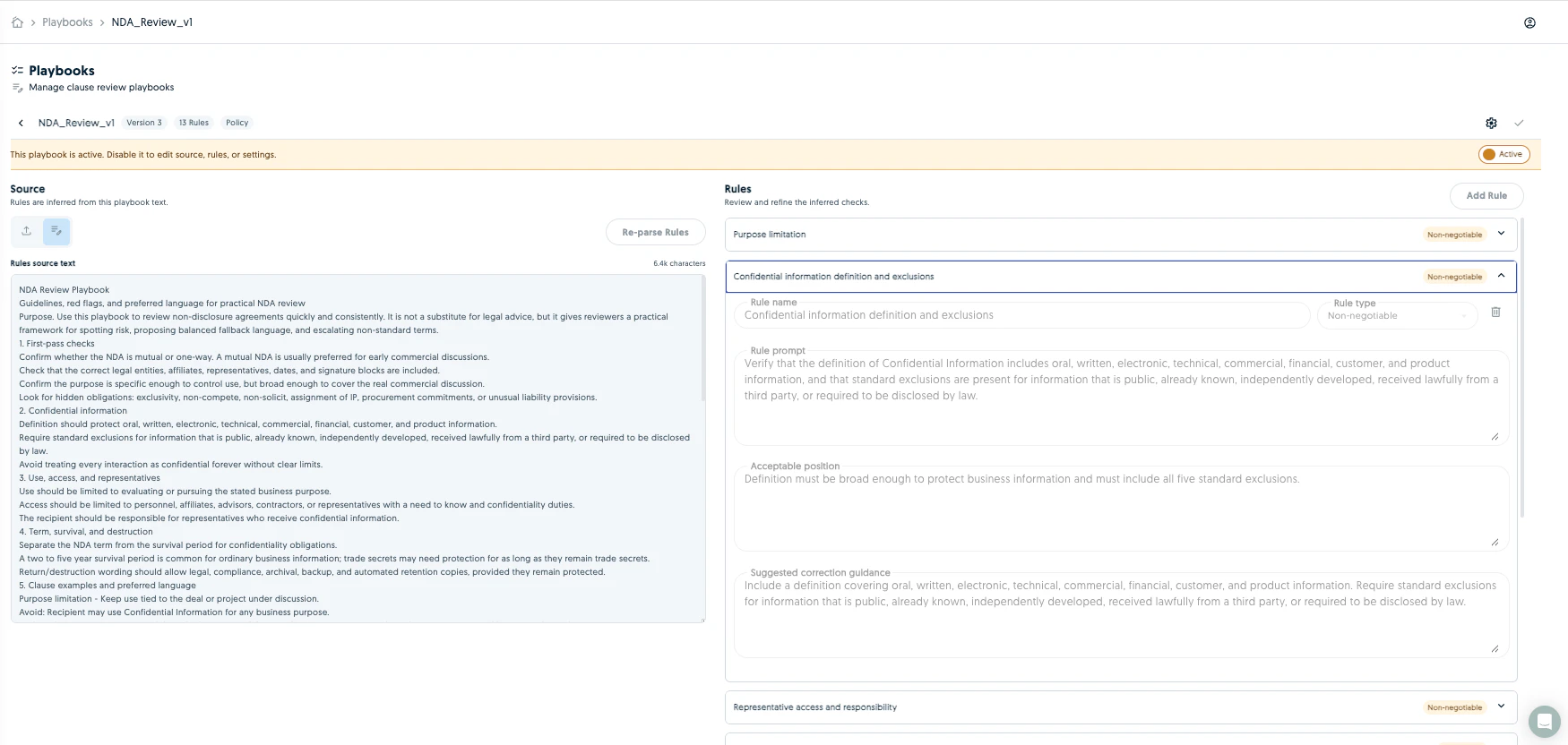
Playbooks turn review policies, clause checklists, rule tables, fallback positions, and negotiation guidance into reusable document reviews.Use Playbooks when a team wants consistent review logic across documents. Use Workbench when the review is still exploratory, and use Workflows when the review should run automatically or require approvals, reports, records, or integrations.
TextMine can parse playbook content from source text, policies, checklists, tables, uploaded documents, or Knowledge Base artifacts and convert it into structured review rules.
Playbooks can be run manually, from Workbench, from Vault, after Vault processing, or as a Workflow step. Runs are tracked as playbook applications with status, reviewed documents, results, and comparison details.Typical run sources:
A user runs a playbook against selected Vault documents.
Workbench applies a playbook during supervised analysis.
A workflow applies a playbook after document import or processing.
A document type or Vault configuration auto-applies a playbook where enabled.
Use Playbook analytics after a playbook has completed runs. Analytics shows compliant rules, non-compliant rules, rules needing review, unobserved rules, potential conflicts, and recommendations for improving rule wording or correction guidance.Analytics helps playbook owners decide whether repeated exceptions are genuine document issues, missing evidence, or playbook rules that should be clarified.
Agents should inspect existing playbooks before creating a new one. If the user wants a repeatable policy review, propose a playbook. If the user wants routing, scheduling, approvals, emails, or integration steps, propose a workflow that applies a playbook.Before running a playbook across many documents, confirm the scope, Vault, document type, and expected output. Before changing a mature playbook, inspect analytics and ask before applying recommendations.
{"docsConfig":{"theme":"mint","$schema":"https://mintlify.com/docs.json","name":"TextMine Help Center","description":"Self-service help for TextMine Workbench, Vault, workflows, records, integrations, permissions, product updates, and agent/API setup.","colors":{"primary":"#0066CC","light":"#3399FF","dark":"#80CDFF"},"logo":{"light":"https://app.textmine.com/assets/text-mine-logo.svg","dark":"https://app.textmine.com/assets/text-mine-logo.svg","href":"https://www.textmine.com"},"favicon":"https://app.textmine.com/favicon.ico","footer":{"links":[{"header":"For agents","items":[{"label":"Agent guide","href":"https://docs.textmine.com/getting-started/for-agents"},{"label":"Developer docs","href":"https://developers.textmine.com/docs/for-agents"},{"label":"Open in ChatGPT","href":"https://chatgpt.com/?q=Use%20TextMine%27s%20agent%20guide%20at%20https%3A%2F%2Fdocs.textmine.com%2Fgetting-started%2Ffor-agents%20and%20developer%20agent%20docs%20at%20https%3A%2F%2Fdevelopers.textmine.com%2Fdocs%2Ffor-agents.%20Help%20me%20choose%20the%20right%20TextMine%20surface%2C%20API%2C%20MCP%20tool%2C%20or%20Zapier%20setup%20for%20my%20task."},{"label":"Open in Claude","href":"https://claude.ai/new?q=Use%20TextMine%27s%20agent%20guide%20at%20https%3A%2F%2Fdocs.textmine.com%2Fgetting-started%2Ffor-agents%20and%20developer%20agent%20docs%20at%20https%3A%2F%2Fdevelopers.textmine.com%2Fdocs%2Ffor-agents.%20Help%20me%20choose%20the%20right%20TextMine%20surface%2C%20API%2C%20MCP%20tool%2C%20or%20Zapier%20setup%20for%20my%20task."},{"label":"Open in Perplexity","href":"https://www.perplexity.ai/search/new?q=Use%20TextMine%27s%20agent%20guide%20at%20https%3A%2F%2Fdocs.textmine.com%2Fgetting-started%2Ffor-agents%20and%20developer%20agent%20docs%20at%20https%3A%2F%2Fdevelopers.textmine.com%2Fdocs%2Ffor-agents.%20Help%20me%20choose%20the%20right%20TextMine%20surface%2C%20API%2C%20MCP%20tool%2C%20or%20Zapier%20setup%20for%20my%20task."}]}]},"search":{"prompt":"Search the TextMine Help Center for Workbench, Vault, workflows, records, integrations, permissions, product updates, or agent and API setup."},"seo":{"metatags":{"canonical":"https://docs.textmine.com","og:title":"TextMine Help Center","og:description":"Self-service help for TextMine Workbench, Vault, workflows, records, integrations, permissions, product updates, and agent/API setup.","twitter:title":"TextMine Help Center","twitter:description":"Self-service help for TextMine Workbench, Vault, workflows, records, integrations, permissions, product updates, and agent/API setup."},"indexing":"all"},"styling":{"eyebrows":"breadcrumbs","latex":false},"contextual":{"options":["chatgpt","claude","perplexity","copy","view"],"display":"header"},"interaction":{"drilldown":true},"metadata":{"timestamp":true},"navigation":{"pages":[]}},"deployment":{"deploymentMetadataValue":{"subdomain":"textmine","hasAudioNarration":false,"actualSubdomain":"textmine","customDomains":["docs.textmine.com"],"gitSource":{"type":"github","owner":"txmltd","repo":"textmine-docs","deployBranch":"main","contentDirectory":"","isPrivate":false,"mountPath":"","label":""},"chroma":{"liveDeploymentHistoryId":"6ab1a6242caf38440b9c5899","collectionId":"4054f7fc-f8cc-4d5c-890a-77fbc95719b0","schemaVersion":"v3","latestBuiltDeploymentHistoryId":"6ab1a6242caf38440b9c5899"},"feedback":{"thumbs":true,"issues":true,"agentFeedback":true},"entitlements":{"AI_CHAT":{"status":"DISABLED"}},"buildId":"6ab1a6242caf38440b9c5899","clientVersion":"0.0.3894","searchFilterCounts":[{"language":"default","tag":"Manage documents and data","count":14},{"language":"default","tag":"Automate work","count":11},{"language":"default","tag":"Connect TextMine","count":11},{"language":"default","tag":"Admin and updates","count":8},{"language":"default","tag":"Vault","count":6},{"language":"default","tag":"Workflows","count":6},{"language":"default","tag":"Start here","count":5},{"language":"default","tag":"Release notes","count":5},{"language":"default","tag":"Use Workbench","count":4},{"language":"default","tag":"Playbooks","count":3}]},"assistantConfig":{"enableAskAiButton":false,"enableStarterQuestions":true,"enableContextualStarterQuestions":true,"enableAskAiSearchBar":true,"deflection":{"enabled":true,"email":"support@textmine.com","showHelpButton":true}},"hasChatPermissions":false,"hasWebMcpPermissions":false,"toggles":[],"isAtlas":false,"googleFontsInlined":false},"customCss":[],"page":{"pagePath":"playbooks/overview","slug":"/playbooks/overview","pageMetadata":{"title":"Playbooks overview","description":"Learn how TextMine playbooks apply reusable document review rules, checklists, negotiation guidance, analytics, and structured findings to Vault documents.","href":"/playbooks/overview"},"description":{"compiledSource":"\"use strict\";\nconst {jsx: _jsx} = arguments[0];\nconst {useMDXComponents: _provideComponents} = arguments[0];\nfunction _createMdxContent(props) {\n const _components = {\n p: \"p\",\n ..._provideComponents(),\n ...props.components\n };\n return _jsx(_components.p, {\n children: \"Learn how TextMine playbooks apply reusable document review rules, checklists, negotiation guidance, analytics, and structured findings to Vault documents.\"\n });\n}\nfunction MDXContent(props = {}) {\n const {wrapper: MDXLayout} = {\n ..._provideComponents(),\n ...props.components\n };\n return MDXLayout ? _jsx(MDXLayout, {\n ...props,\n children: _jsx(_createMdxContent, {\n ...props\n })\n }) : _createMdxContent(props);\n}\nreturn {\n default: MDXContent\n};\n","frontmatter":{},"scope":{}},"pageType":"default","mdx":{"mdxSource":{"compiledSource":"\"use strict\";const{Fragment:_Fragment,jsx:_jsx,jsxs:_jsxs}=arguments[0];const{useMDXComponents:_provideComponents}=arguments[0];function _createMdxContent(props){const _components={a:`a`,li:`li`,p:`p`,tbody:`tbody`,td:`td`,th:`th`,thead:`thead`,tr:`tr`,ul:`ul`,..._provideComponents(),...props.components},{Heading,OptimizedImage,Table}=_components;if(!Heading)_missingMdxReference(`Heading`,true);if(!OptimizedImage)_missingMdxReference(`OptimizedImage`,true);if(!Table)_missingMdxReference(`Table`,true);return _jsxs(_Fragment,{children:[_jsx(_components.p,{children:`Playbooks turn review policies, clause checklists, rule tables, fallback positions, and negotiation guidance into reusable document reviews.`}),`\n`,_jsx(OptimizedImage,{src:`https://mintcdn.com/textmine/Wb04UT80sqhf9k3p/images/intercom/product-updates/26-may-2026/05-screenshot-2026-05-26-at-14-22-25.png?fit=max\u0026auto=format\u0026n=Wb04UT80sqhf9k3p\u0026q=85\u0026s=0da42f0833749f723be13f371635fce9`,alt:`TextMine Playbooks screen showing reusable review rules for Vault documents`,\"data-og-width\":`1750`,width:`1750`,\"data-og-height\":`832`,height:`832`,\"data-path\":`images/intercom/product-updates/26-may-2026/05-screenshot-2026-05-26-at-14-22-25.png`,\"data-optimize\":`true`,\"data-opv\":`3`,srcset:`https://mintcdn.com/textmine/Wb04UT80sqhf9k3p/images/intercom/product-updates/26-may-2026/05-screenshot-2026-05-26-at-14-22-25.png?w=280\u0026fit=max\u0026auto=format\u0026n=Wb04UT80sqhf9k3p\u0026q=85\u0026s=4b2ac5cd642598fdf52c89a9910c4707 280w, https://mintcdn.com/textmine/Wb04UT80sqhf9k3p/images/intercom/product-updates/26-may-2026/05-screenshot-2026-05-26-at-14-22-25.png?w=560\u0026fit=max\u0026auto=format\u0026n=Wb04UT80sqhf9k3p\u0026q=85\u0026s=f4e036725aeedc70255636967511e2b0 560w, https://mintcdn.com/textmine/Wb04UT80sqhf9k3p/images/intercom/product-updates/26-may-2026/05-screenshot-2026-05-26-at-14-22-25.png?w=840\u0026fit=max\u0026auto=format\u0026n=Wb04UT80sqhf9k3p\u0026q=85\u0026s=bda3b58eff126d795d9a5941506c3462 840w, https://mintcdn.com/textmine/Wb04UT80sqhf9k3p/images/intercom/product-updates/26-may-2026/05-screenshot-2026-05-26-at-14-22-25.png?w=1100\u0026fit=max\u0026auto=format\u0026n=Wb04UT80sqhf9k3p\u0026q=85\u0026s=76324cf78e76868353fe8d9b47bb8b51 1100w, https://mintcdn.com/textmine/Wb04UT80sqhf9k3p/images/intercom/product-updates/26-may-2026/05-screenshot-2026-05-26-at-14-22-25.png?w=1650\u0026fit=max\u0026auto=format\u0026n=Wb04UT80sqhf9k3p\u0026q=85\u0026s=69a59939d045a91275dfbeb3041f4ddc 1650w, https://mintcdn.com/textmine/Wb04UT80sqhf9k3p/images/intercom/product-updates/26-may-2026/05-screenshot-2026-05-26-at-14-22-25.png?w=2500\u0026fit=max\u0026auto=format\u0026n=Wb04UT80sqhf9k3p\u0026q=85\u0026s=beb232140c9b68e93e06bc0aad8df2cc 2500w`}),`\n`,_jsx(_components.p,{children:`Use Playbooks when a team wants consistent review logic across documents. Use Workbench when the review is still exploratory, and use Workflows when the review should run automatically or require approvals, reports, records, or integrations.`}),`\n`,_jsx(Heading,{level:`2`,id:`what-a-playbook-contains`,children:`What a playbook contains`}),`\n`,_jsx(_components.p,{children:`A playbook can include:`}),`\n`,_jsxs(_components.ul,{children:[`\n`,_jsx(_components.li,{children:`Review rules.`}),`\n`,_jsx(_components.li,{children:`Expected positions.`}),`\n`,_jsx(_components.li,{children:`Fallback positions.`}),`\n`,_jsx(_components.li,{children:`Red flags.`}),`\n`,_jsx(_components.li,{children:`Clause examples.`}),`\n`,_jsx(_components.li,{children:`Risk severity.`}),`\n`,_jsx(_components.li,{children:`Recommended actions.`}),`\n`,_jsx(_components.li,{children:`Reviewer guidance.`}),`\n`,_jsx(_components.li,{children:`Comparison criteria.`}),`\n`]}),`\n`,_jsx(_components.p,{children:`TextMine can parse playbook content from source text, policies, checklists, tables, uploaded documents, or Knowledge Base artifacts and convert it into structured review rules.`}),`\n`,_jsx(Heading,{level:`2`,id:`playbook-types`,children:`Playbook types`}),`\n`,_jsxs(Table,{children:[_jsx(_components.thead,{children:_jsxs(_components.tr,{children:[_jsx(_components.th,{children:`Type`}),_jsx(_components.th,{children:`Use it for`})]})}),_jsxs(_components.tbody,{children:[_jsxs(_components.tr,{children:[_jsx(_components.td,{children:`Contract review playbook`}),_jsx(_components.td,{children:`Review clauses in NDAs, MSAs, supplier agreements, credit agreements, leases, or other contracts.`})]}),_jsxs(_components.tr,{children:[_jsx(_components.td,{children:`Policy playbook`}),_jsx(_components.td,{children:`Check documents against a policy or compliance standard.`})]}),_jsxs(_components.tr,{children:[_jsx(_components.td,{children:`Negotiation playbook`}),_jsx(_components.td,{children:`Compare document language against preferred and fallback positions.`})]}),_jsxs(_components.tr,{children:[_jsx(_components.td,{children:`Risk playbook`}),_jsx(_components.td,{children:`Identify red flags, severity, mitigations, and escalation requirements.`})]}),_jsxs(_components.tr,{children:[_jsx(_components.td,{children:`Master agreement playbook`}),_jsx(_components.td,{children:`Compare amendments, order forms, schedules, or statements of work against a master agreement position.`})]})]})]}),`\n`,_jsx(Heading,{level:`2`,id:`where-playbooks-run`,children:`Where playbooks run`}),`\n`,_jsx(_components.p,{children:`Playbooks can be run manually, from Workbench, from Vault, after Vault processing, or as a Workflow step. Runs are tracked as playbook applications with status, reviewed documents, results, and comparison details.`}),`\n`,_jsx(_components.p,{children:`Typical run sources:`}),`\n`,_jsxs(_components.ul,{children:[`\n`,_jsx(_components.li,{children:`A user runs a playbook against selected Vault documents.`}),`\n`,_jsx(_components.li,{children:`Workbench applies a playbook during supervised analysis.`}),`\n`,_jsx(_components.li,{children:`A workflow applies a playbook after document import or processing.`}),`\n`,_jsx(_components.li,{children:`A document type or Vault configuration auto-applies a playbook where enabled.`}),`\n`]}),`\n`,_jsx(Heading,{level:`2`,id:`playbook-outputs`,children:`Playbook outputs`}),`\n`,_jsx(_components.p,{children:`A playbook run can produce:`}),`\n`,_jsxs(_components.ul,{children:[`\n`,_jsx(_components.li,{children:`Clause-by-clause findings.`}),`\n`,_jsx(_components.li,{children:`Risk issue lists.`}),`\n`,_jsx(_components.li,{children:`Pass/fail or accepted/deviation status.`}),`\n`,_jsx(_components.li,{children:`Comparison against preferred and fallback positions.`}),`\n`,_jsx(_components.li,{children:`Review memos or Word artifacts.`}),`\n`,_jsx(_components.li,{children:`Evidence references to the underlying document.`}),`\n`,_jsx(_components.li,{children:`Escalation or approval inputs for a workflow.`}),`\n`]}),`\n`,_jsx(Heading,{level:`2`,id:`analytics-and-improvement`,children:`Analytics and improvement`}),`\n`,_jsxs(_components.p,{children:[`Use `,_jsx(_components.a,{href:`/playbooks/analytics`,children:`Playbook analytics`}),` after a playbook has completed runs. Analytics shows compliant rules, non-compliant rules, rules needing review, unobserved rules, potential conflicts, and recommendations for improving rule wording or correction guidance.`]}),`\n`,_jsx(_components.p,{children:`Analytics helps playbook owners decide whether repeated exceptions are genuine document issues, missing evidence, or playbook rules that should be clarified.`}),`\n`,_jsx(Heading,{level:`2`,id:`example-use-cases`,children:`Example use cases`}),`\n`,_jsxs(Table,{children:[_jsx(_components.thead,{children:_jsxs(_components.tr,{children:[_jsx(_components.th,{children:`Team`}),_jsx(_components.th,{children:`Playbook`}),_jsx(_components.th,{children:`Output`})]})}),_jsxs(_components.tbody,{children:[_jsxs(_components.tr,{children:[_jsx(_components.td,{children:`Legal`}),_jsx(_components.td,{children:`NDA review`}),_jsx(_components.td,{children:`Red flags, fallback positions, and approval recommendations.`})]}),_jsxs(_components.tr,{children:[_jsx(_components.td,{children:`Procurement`}),_jsx(_components.td,{children:`Supplier contract review`}),_jsx(_components.td,{children:`Renewal, termination, liability, pricing, and data-protection issues.`})]}),_jsxs(_components.tr,{children:[_jsx(_components.td,{children:`Financial services`}),_jsx(_components.td,{children:`Credit agreement review`}),_jsx(_components.td,{children:`Covenant, reporting obligation, security, and jurisdiction exceptions.`})]}),_jsxs(_components.tr,{children:[_jsx(_components.td,{children:`Risk advisory`}),_jsx(_components.td,{children:`Control evidence review`}),_jsx(_components.td,{children:`Exceptions, missing evidence, and recommended remediation.`})]})]})]}),`\n`,_jsx(Heading,{level:`2`,id:`agent-guidance`,children:`Agent guidance`}),`\n`,_jsx(_components.p,{children:`Agents should inspect existing playbooks before creating a new one. If the user wants a repeatable policy review, propose a playbook. If the user wants routing, scheduling, approvals, emails, or integration steps, propose a workflow that applies a playbook.`}),`\n`,_jsx(_components.p,{children:`Before running a playbook across many documents, confirm the scope, Vault, document type, and expected output. Before changing a mature playbook, inspect analytics and ask before applying recommendations.`})]})}function MDXContent(props={}){const{wrapper:MDXLayout}={..._provideComponents(),...props.components};return MDXLayout?_jsx(MDXLayout,{...props,children:_jsx(_createMdxContent,{...props})}):_createMdxContent(props)}return{default:MDXContent};function _missingMdxReference(id,component){throw new Error(`Expected `+(component?`component`:`object`)+\" `\"+id+\"` to be defined: you likely forgot to import, pass, or provide it.\")}","frontmatter":{},"scope":{"config":{},"pageMetadata":{"title":"Playbooks overview","description":"Learn how TextMine playbooks apply reusable document review rules, checklists, negotiation guidance, analytics, and structured findings to Vault documents.","href":"/playbooks/overview"}}},"mdxSourceWithNoJs":null},"mdxExtracts":{"tableOfContents":[{"title":"What a playbook contains","slug":"what-a-playbook-contains","depth":2,"children":[]},{"title":"Playbook types","slug":"playbook-types","depth":2,"children":[]},{"title":"Where playbooks run","slug":"where-playbooks-run","depth":2,"children":[]},{"title":"Playbook outputs","slug":"playbook-outputs","depth":2,"children":[]},{"title":"Analytics and improvement","slug":"analytics-and-improvement","depth":2,"children":[]},{"title":"Example use cases","slug":"example-use-cases","depth":2,"children":[]},{"title":"Agent guidance","slug":"agent-guidance","depth":2,"children":[]}],"codeExamples":{}},"jsLinks":[],"subdomain":"textmine","siteName":"TextMine Help Center","title":"TextMine Help Center","contextualStarterQuestions":[{"_id":"6a3d9f5e2c77af4dadd86132","deploymentId":"6a0f81da77ddd2145b4b7df2","questionText":"What can playbooks help with?","status":"active","generatedBy":"contextual","path":"playbooks/overview","createdAt":"2026-06-25T21:36:30.789Z","updatedAt":"2026-06-25T21:36:30.789Z","__v":0},{"_id":"6a3d9f5e2c77af4dadd86131","deploymentId":"6a0f81da77ddd2145b4b7df2","questionText":"How do I create a playbook?","status":"active","generatedBy":"contextual","path":"playbooks/overview","createdAt":"2026-06-25T21:36:30.789Z","updatedAt":"2026-06-25T21:36:30.789Z","__v":0},{"_id":"6a3d9f5e2c77af4dadd86130","deploymentId":"6a0f81da77ddd2145b4b7df2","questionText":"What are playbooks?","status":"active","generatedBy":"contextual","path":"playbooks/overview","createdAt":"2026-06-25T21:36:30.789Z","updatedAt":"2026-06-25T21:36:30.789Z","__v":0}],"navMaps":{"firstHrefInVersion":{},"firstHrefInLanguage":{}},"lastModified":"2026-06-25T21:36:22.029Z","gitLastModified":"2026-06-25T21:33:53.000Z","originalFileLocation":"playbooks/overview.mdx"},"headHtml":"\u003cmeta data-mint-head name=\"description\" content=\"Learn how TextMine playbooks apply reusable document review rules, checklists, negotiation guidance, analytics, and structured findings to Vault documents.\">\u003cmeta data-mint-head name=\"application-name\" content=\"TextMine Help Center\">\u003cmeta data-mint-head name=\"generator\" content=\"Mintlify\">\u003clink data-mint-head rel=\"apple-touch-icon\" type=\"image/x-icon\" sizes=\"180x180\" href=\"https://app.textmine.com/favicon.ico\">\u003clink data-mint-head rel=\"icon\" type=\"image/x-icon\" sizes=\"32x32\" href=\"https://app.textmine.com/favicon.ico\">\u003clink data-mint-head rel=\"icon\" type=\"image/x-icon\" sizes=\"16x16\" href=\"https://app.textmine.com/favicon.ico\">\u003clink data-mint-head rel=\"shortcut icon\" type=\"image/x-icon\" href=\"https://app.textmine.com/favicon.ico\">\u003cmeta data-mint-head property=\"og:title\" content=\"TextMine Help Center\">\u003cmeta data-mint-head property=\"og:description\" content=\"Self-service help for TextMine Workbench, Vault, workflows, records, integrations, permissions, product updates, and agent/API setup.\">\u003cmeta data-mint-head property=\"og:site_name\" content=\"TextMine Help Center\">\u003cmeta data-mint-head property=\"og:url\" content=\"https://docs.textmine.com/playbooks/overview\">\u003cmeta data-mint-head property=\"og:type\" content=\"website\">\u003cmeta data-mint-head name=\"twitter:card\" content=\"summary_large_image\">\u003cmeta data-mint-head name=\"twitter:title\" content=\"TextMine Help Center\">\u003cmeta data-mint-head name=\"twitter:description\" content=\"Self-service help for TextMine Workbench, Vault, workflows, records, integrations, permissions, product updates, and agent/API setup.\">\u003cmeta data-mint-head name=\"msapplication-config\" content=\"https://mintlify.s3.us-west-1.amazonaws.com/textmine/_generated/favicon/browserconfig.xml?v=3\">\u003cmeta data-mint-head name=\"apple-mobile-web-app-title\" content=\"TextMine Help Center\">\u003cmeta data-mint-head name=\"msapplication-TileColor\" content=\"#0066CC\">\u003clink data-mint-head rel=\"canonical\" href=\"https://docs.textmine.com/playbooks/overview\">\u003clink data-mint-head rel=\"alternate\" type=\"application/xml\" href=\"/sitemap.xml\">\u003clink data-mint-head rel=\"alternate\" type=\"text/markdown\" href=\"/playbooks/overview.md\">\u003cscript data-mint-head type=\"application/ld+json\">{\"@context\":\"https://schema.org\",\"@graph\":[{\"@type\":\"Organization\",\"@id\":\"https://docs.textmine.com/#organization\",\"name\":\"TextMine Help Center\",\"url\":\"https://docs.textmine.com\",\"logo\":{\"@type\":\"ImageObject\",\"url\":\"https://app.textmine.com/assets/text-mine-logo.svg\"}},{\"@type\":\"WebSite\",\"@id\":\"https://docs.textmine.com#website\",\"name\":\"TextMine Help Center\",\"url\":\"https://docs.textmine.com\",\"publisher\":{\"@id\":\"https://docs.textmine.com/#organization\"}},{\"@type\":\"WebPage\",\"@id\":\"https://docs.textmine.com/playbooks/overview#webpage\",\"url\":\"https://docs.textmine.com/playbooks/overview\",\"name\":\"Playbooks overview\",\"description\":\"Learn how TextMine playbooks apply reusable document review rules, checklists, negotiation guidance, analytics, and structured findings to Vault documents.\",\"dateModified\":\"2026-06-25T21:33:53.000Z\",\"isPartOf\":{\"@id\":\"https://docs.textmine.com#website\"},\"breadcrumb\":{\"@id\":\"https://docs.textmine.com/playbooks/overview#breadcrumb\"}},{\"@type\":\"BreadcrumbList\",\"@id\":\"https://docs.textmine.com/playbooks/overview#breadcrumb\",\"itemListElement\":[{\"@type\":\"ListItem\",\"position\":1,\"name\":\"Automate work\",\"item\":\"https://docs.textmine.com/automation/index\"},{\"@type\":\"ListItem\",\"position\":2,\"name\":\"Playbooks overview\",\"item\":\"https://docs.textmine.com/playbooks/overview\"}]},{\"@type\":[\"Article\",\"TechArticle\"],\"@id\":\"https://docs.textmine.com/playbooks/overview#article\",\"headline\":\"Playbooks overview\",\"name\":\"Playbooks overview\",\"description\":\"Learn how TextMine playbooks apply reusable document review rules, checklists, negotiation guidance, analytics, and structured findings to Vault documents.\",\"url\":\"https://docs.textmine.com/playbooks/overview\",\"mainEntityOfPage\":{\"@id\":\"https://docs.textmine.com/playbooks/overview#webpage\"},\"dateModified\":\"2026-06-25T21:33:53.000Z\",\"publisher\":{\"@id\":\"https://docs.textmine.com/#organization\"},\"isPartOf\":{\"@id\":\"https://docs.textmine.com#website\"}}]}\u003c/script>\u003cscript data-mint-head type=\"application/ld+json\">{\"@context\":\"https://schema.org\",\"@type\":\"WebSite\",\"name\":\"TextMine Help Center\",\"creator\":{\"@type\":\"Organization\",\"name\":\"Mintlify\",\"url\":\"https://mintlify.com\"}}\u003c/script>","siteName":"TextMine Help Center","nav":{"global":null,"groups":[{"group":"Start here","pages":[{"title":"TextMine Help Center","href":"/index"},{"title":"Product map","href":"/getting-started/product-map"},{"title":"Quick start","href":"/getting-started/quick-start"},{"title":"Agents, Public API, and MCP","href":"/getting-started/for-agents"},{"title":"Contact support","href":"/support"}]},{"group":"Use Workbench","pages":[{"title":"Workbench overview","href":"/workbench/overview"},{"title":"Workbench capabilities","href":"/workbench/capabilities"},{"title":"Use files and integrations in Workbench","href":"/workbench/uploads-and-integrations"},{"title":"Goals, tasks, and artifacts","href":"/workbench/goals-tasks-and-artifacts"}]},{"group":"Manage documents and data","pages":[{"title":"Manage documents and data in TextMine","href":"/documents-and-data/index"},{"group":"Knowledge Bases","pages":[{"title":"Knowledge Bases overview","href":"/knowledge-bases/overview"}]},{"group":"Vault","pages":[{"title":"Vault overview","href":"/vault/overview"},{"title":"Vault and editor capabilities","href":"/vault/capabilities"},{"title":"Document types and tags","href":"/vault/document-types-and-tags"},{"title":"Explore documents","sidebarTitle":"Explore","href":"/vault/explore"},{"title":"Tags and extraction","href":"/vault/tags-and-extraction"},{"title":"Ask Vault and reports","href":"/vault/ask-vault-and-reports"}]},{"group":"Legislate","pages":[{"title":"Legislate overview","href":"/legislate/overview"}]},{"group":"Records","pages":[{"title":"Records overview","href":"/records/overview"},{"title":"Schemas and review candidates","href":"/records/schemas-and-candidates"},{"title":"Ask, graph, and enrich records","href":"/records/ask-graph-and-enrichment"}]},{"group":"Reports and exports","pages":[{"title":"Reports and exports","href":"/reports-and-exports/overview"}]},{"group":"Scribe","pages":[{"title":"Scribe overview","href":"/scribe/overview"}]}]},{"group":"Automate work","pages":[{"title":"Automate work in TextMine","href":"/automation/index"},{"group":"Workflows","pages":[{"title":"Workflows overview","href":"/workflows/overview"},{"title":"Workflow blocks","href":"/workflows/blocks"},{"title":"Workflow examples","href":"/workflows/examples"},{"title":"Create a workflow","href":"/workflows/create-a-workflow"},{"title":"Email, intake forms, and approvals","href":"/workflows/email-intake-and-approvals"},{"title":"Records and integrations in workflows","description":"Connect workflows to records, APIs, SEC data, and external systems.","href":"/workflows/records-and-integrations"}]},{"group":"Playbooks","pages":[{"title":"Playbooks overview","href":"/playbooks/overview"},{"title":"Create and run a playbook","description":"Create a playbook, apply it to Vault documents, and review run outputs and analytics.","href":"/playbooks/create-and-run"},{"title":"Playbook analytics","href":"/playbooks/analytics"}]},{"group":"Agents","pages":[{"title":"Agents overview","href":"/agents/overview"}]}]},{"group":"Connect TextMine","pages":[{"title":"Integrations overview","href":"/integrations/overview"},{"title":"Agent self-service signup","sidebarTitle":"Agent self-serve","href":"/integrations/third-party-agent-signup"},{"title":"Integration catalog","href":"/integrations/catalog"},{"title":"Workbench MCP providers","href":"/integrations/workbench-mcp-providers"},{"title":"TextMine MCP server","href":"/integrations/textmine-mcp-server"},{"title":"Slack","sidebarTitle":"Slack","href":"/integrations/slack"},{"title":"Set up TextMine in Copilot Studio","href":"/integrations/copilot-studio"},{"title":"TextMine CLI","sidebarTitle":"TextMine CLI","href":"/integrations/textmine-cli"},{"title":"CLI quickstart","sidebarTitle":"CLI quickstart","href":"/integrations/cli-quickstart"},{"title":"API and developer docs","href":"/integrations/api-and-developer-docs"},{"title":"Zapier","sidebarTitle":"Zapier","href":"/integrations/zapier"}]},{"group":"Admin and updates","pages":[{"title":"Manage TextMine access and updates","href":"/admin-and-updates/index"},{"group":"Administration","pages":[{"title":"Permissions and feature access","href":"/administration/permissions"}]},{"group":"Release notes","pages":[{"title":"Release notes","href":"/release-notes/index"},{"title":"21 September 2026","href":"/release-notes/21-september-2026"},{"title":"25 June 2026","href":"/release-notes/25-june-2026"},{"title":"15 June 2026","href":"/release-notes/15-june-2026"},{"title":"7 June 2026","href":"/release-notes/7-june-2026"}]},{"group":"Archive","pages":[{"title":"Intercom archive","href":"/archive/intercom/index"}]}]}]},"title":"TextMine Help Center","buildId":"dpl_8LJVMfxYNq6LJkohTrn2iyWT8umj","deploymentId":"dpl_8LJVMfxYNq6LJkohTrn2iyWT8umj","dynamics":["a74be98ba7"],"chunks":["zoom-image-lightbox-D9lJgLSo.js","PlusIcon-C1lem43w.js","lightbox-handle-r17bVUz3.js"]}